<?xml version="1.0" encoding="utf-8"?><feed xmlns="http://www.w3.org/2005/Atom" ><generator uri="https://jekyllrb.com/" version="3.10.0">Jekyll</generator><link href="/feed.xml" rel="self" type="application/atom+xml" /><link href="/" rel="alternate" type="text/html" /><updated>2026-08-16T22:11:48+00:00</updated><id>/feed.xml</id><title type="html">Owen O’Malley</title><subtitle>Computer Graphics Student</subtitle><author><name>Owen O&apos;Malley</name></author><entry><title type="html">The Mk11 Livery</title><link href="/blog/painting-mk11/" rel="alternate" type="text/html" title="The Mk11 Livery" /><published>2026-05-28T00:00:00+00:00</published><updated>2026-05-28T00:00:00+00:00</updated><id>/blog/painting-mk11</id><content type="html" xml:base="/blog/painting-mk11/"><![CDATA[<p>Paint is justifilbly a mess, so the goal was to paint the car in fashion only achievable by paint. Oh, and tell a cool story at the same time. That’s important too.</p>

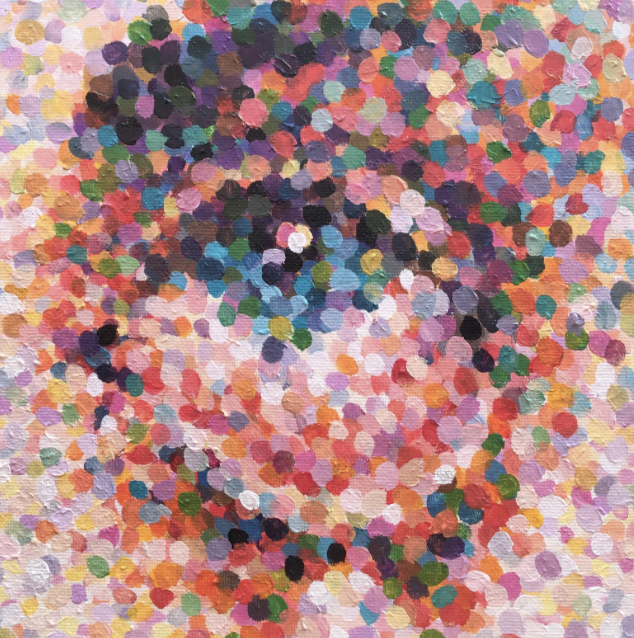
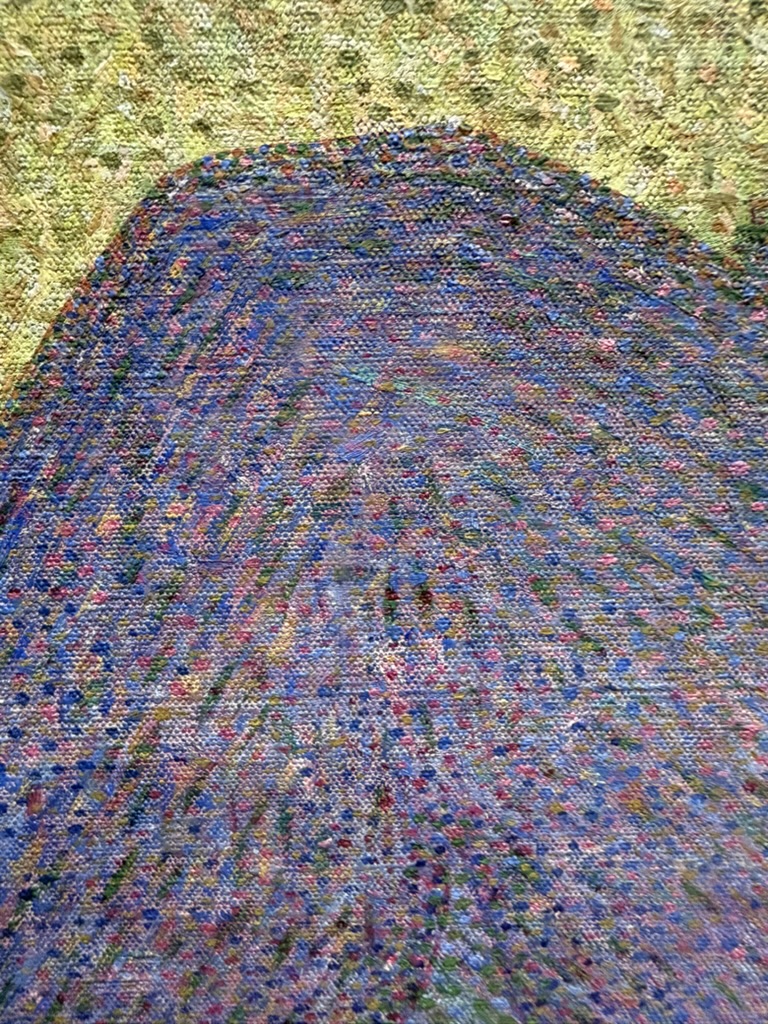
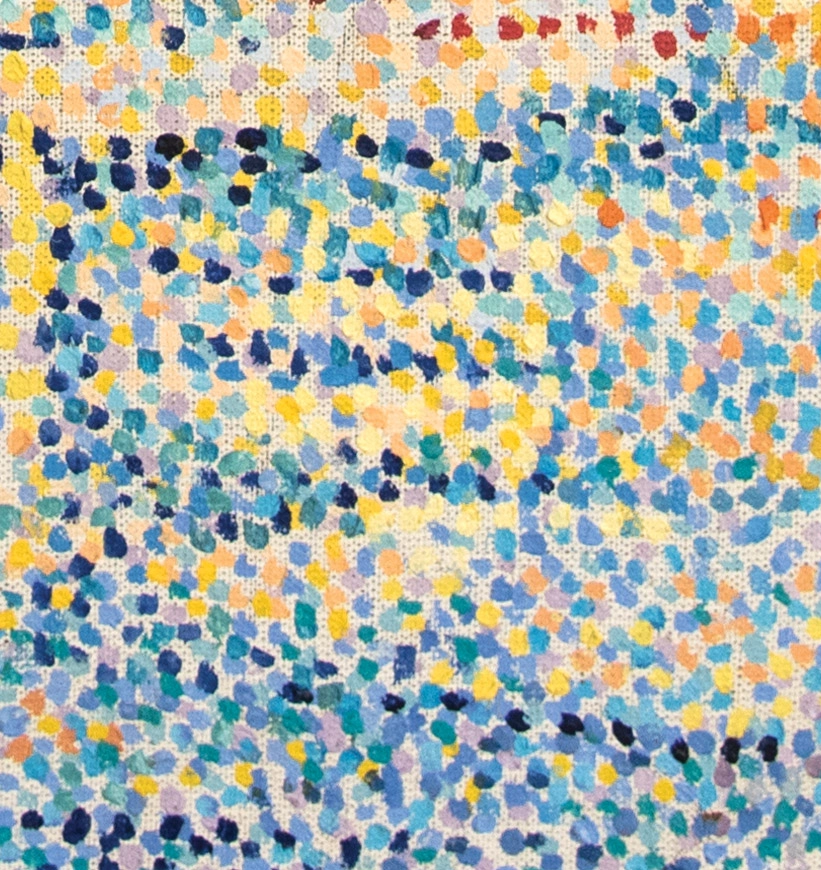
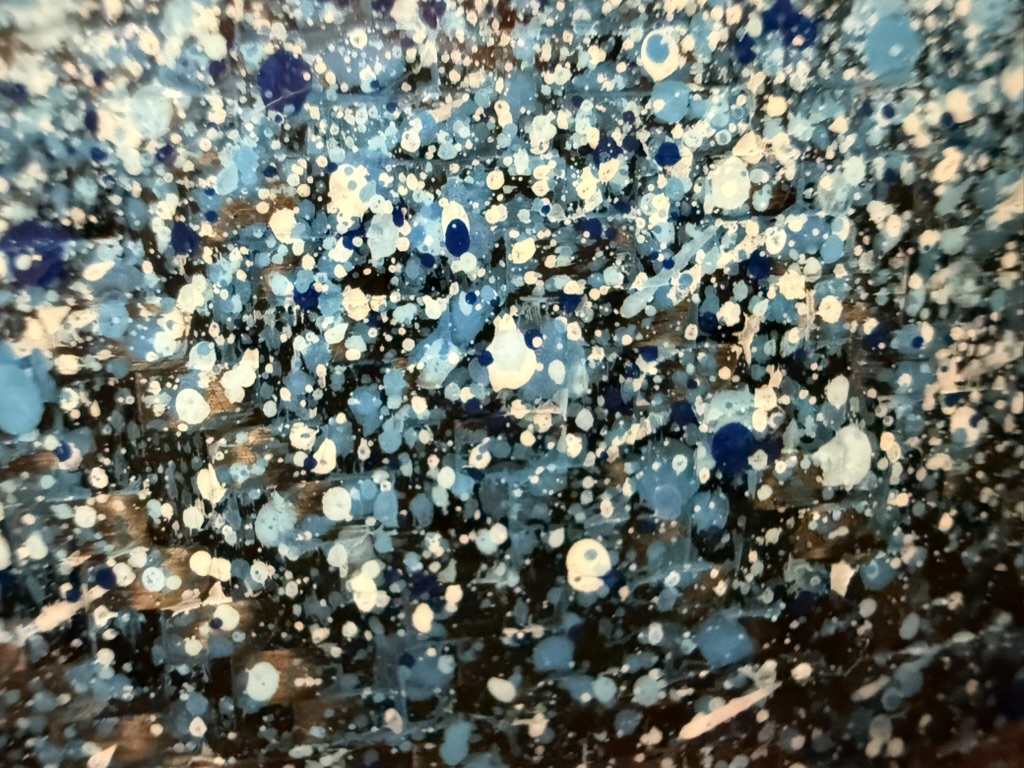
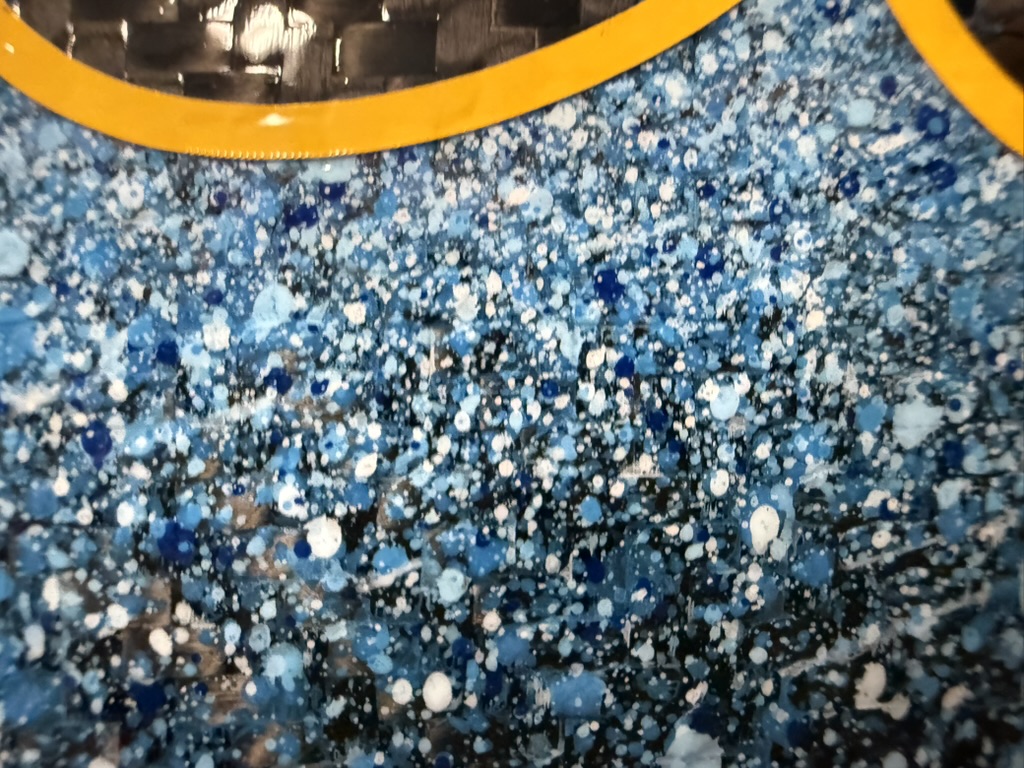
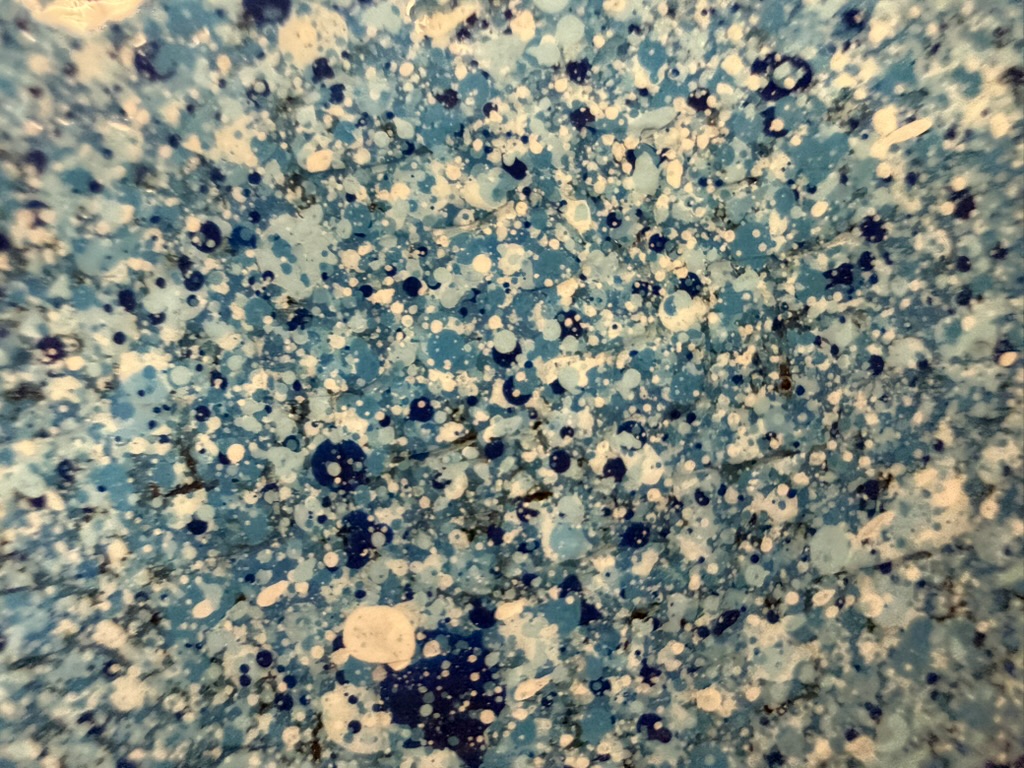
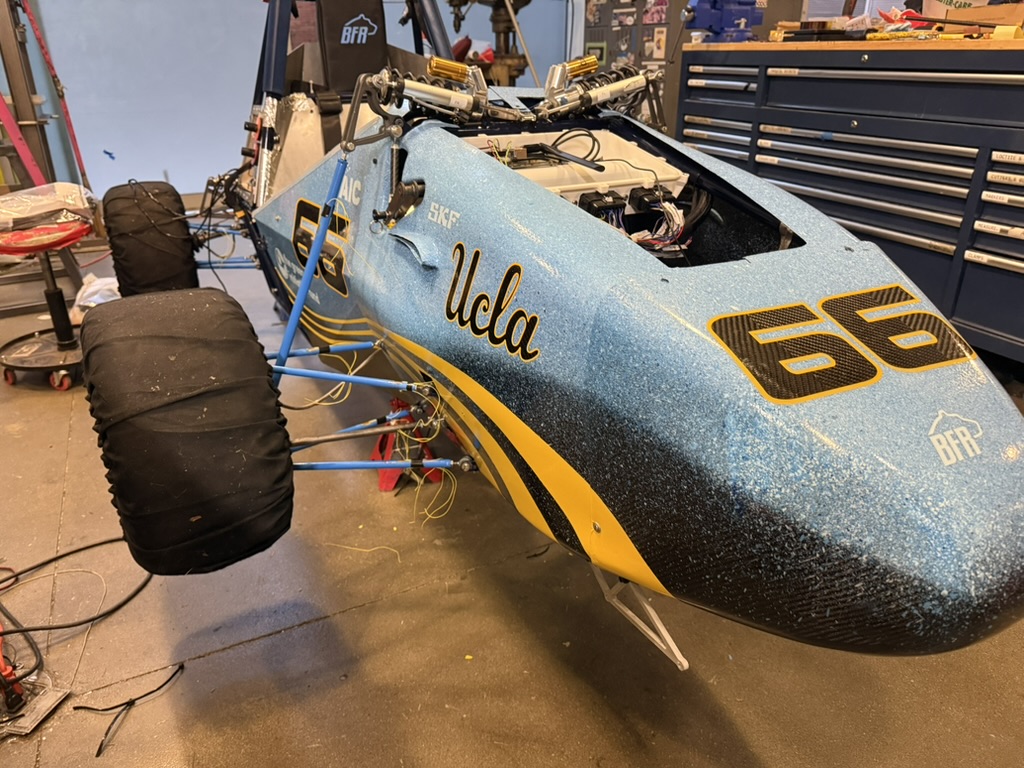
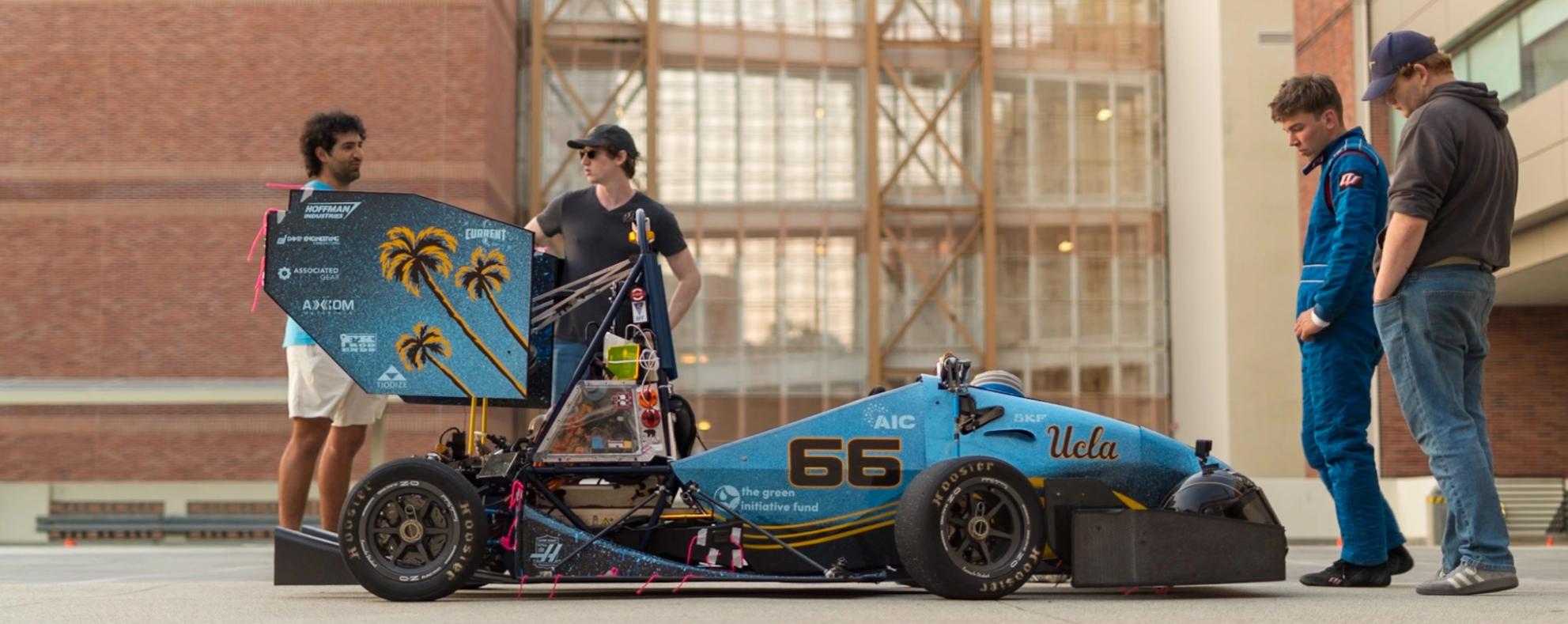
<p>The design originated with the painting techniques of Seurat and Monet. Both paint using very small dots to take advantage of an effect called optical mixing. When you look at a distance the shapes appear to take on one color, but up close the small dots that compose the canvas become more individually separable. Their pieces have two completely different reads based on the distance at which you view them. I figured these varied dots could give us a watery and city vibe perfect for LA.</p>

<table style="border-collapse: collapse; width: 100%;">
  <tr>
    <td style="padding: 0 4px; text-align: center;"><img src="/assets/images/posts/2026-05-28-painting-mk11/image%201.png" style="height: 240px; width: 100%; object-fit: cover;" /></td>
    <td style="padding: 0 4px; text-align: center;"><img src="/assets/images/posts/2026-05-28-painting-mk11/871AE0C4-B91C-40F7-8A82-BEF88B2B67D9_1_105_c.jpeg" style="height: 240px; width: 100%; object-fit: cover;" /></td>
    <td style="padding: 0 4px; text-align: center;"><img src="/assets/images/posts/2026-05-28-painting-mk11/16c17d9e-2f29-42c2-b062-8d47187ff7db.png" style="height: 240px; width: 100%; object-fit: cover;" /></td>
  </tr>
</table>

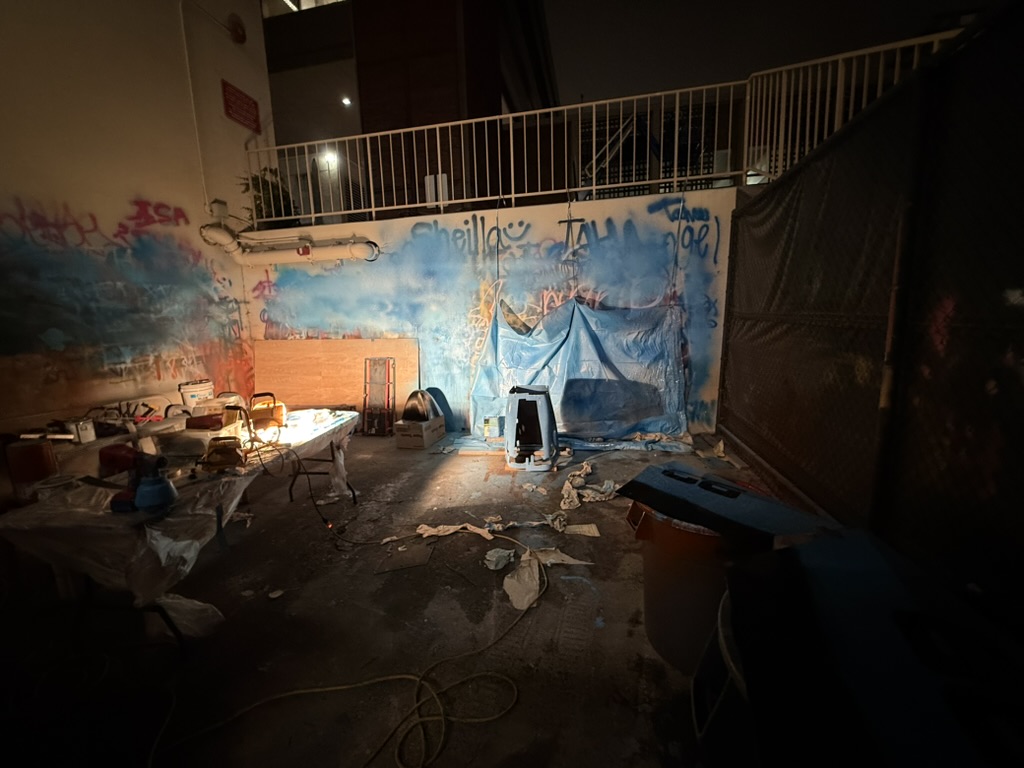
<p>Achieving this look required a paint gun, so we ordered one. Paint guns are designed to spray smooth streams of air to create even coats of paint. The gun sips paint from a canister using a straw. Much like drinking from an empty juice box, if the straw takes in both air and paint, it’ll emit a choppy flow. The trick was to constantly adjust the angle of the gun to keep this effect going.</p>

<p>The paint needed some changes paint as well. To make my life simple, I used only blue and white paint as opposed to all three of the primary colors. Adding urethane thinned down the paint too, increasing the size of the splatter. By the time I had the right ratios, I ran out of uthreane, and had to resort to a poop mix of organic solvents - isopropyl alcohol, kerosene, acetone - to actually finish the car. This was a risky move as they evaporate much slower than urethane, but it turned out ok.</p>

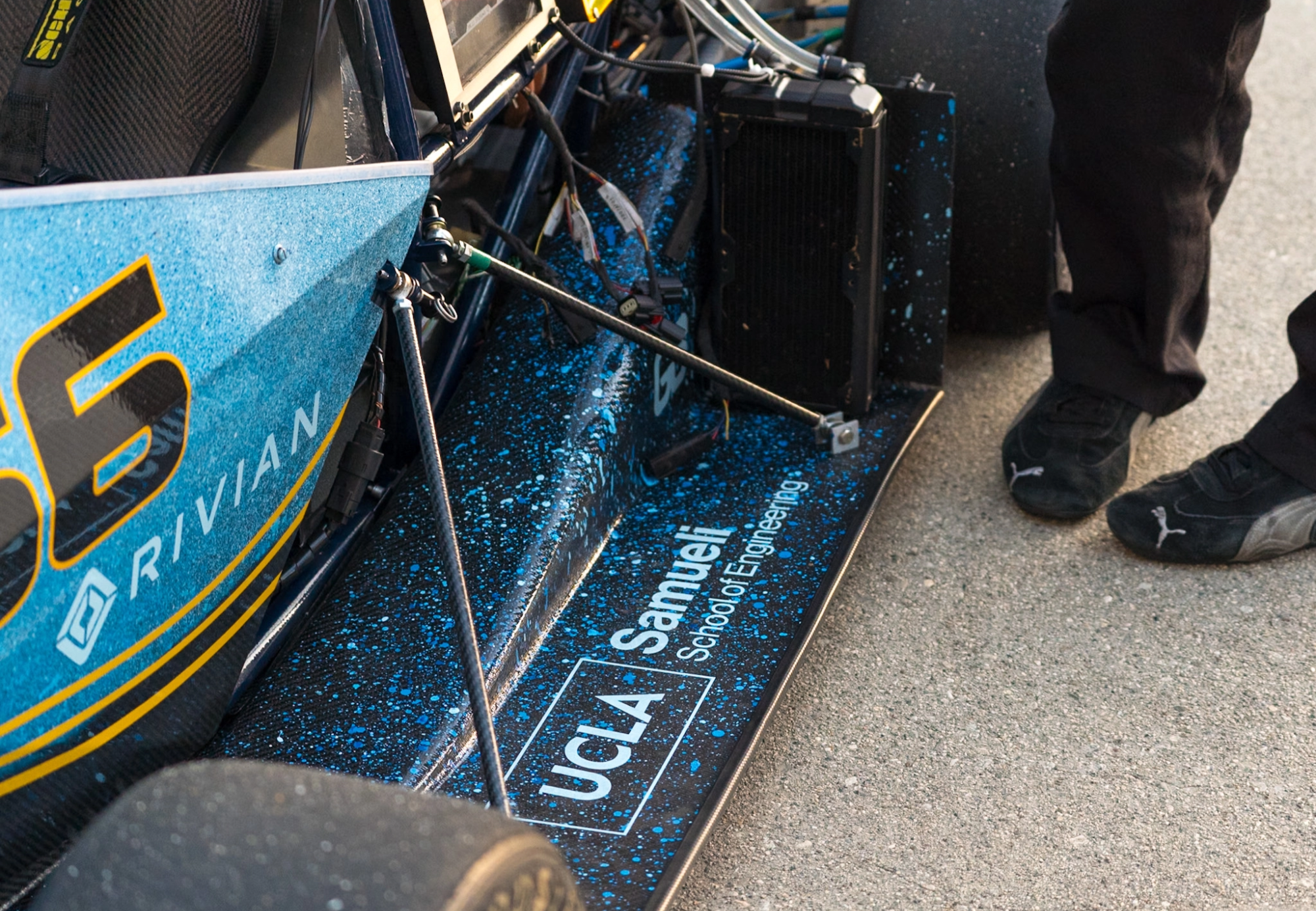
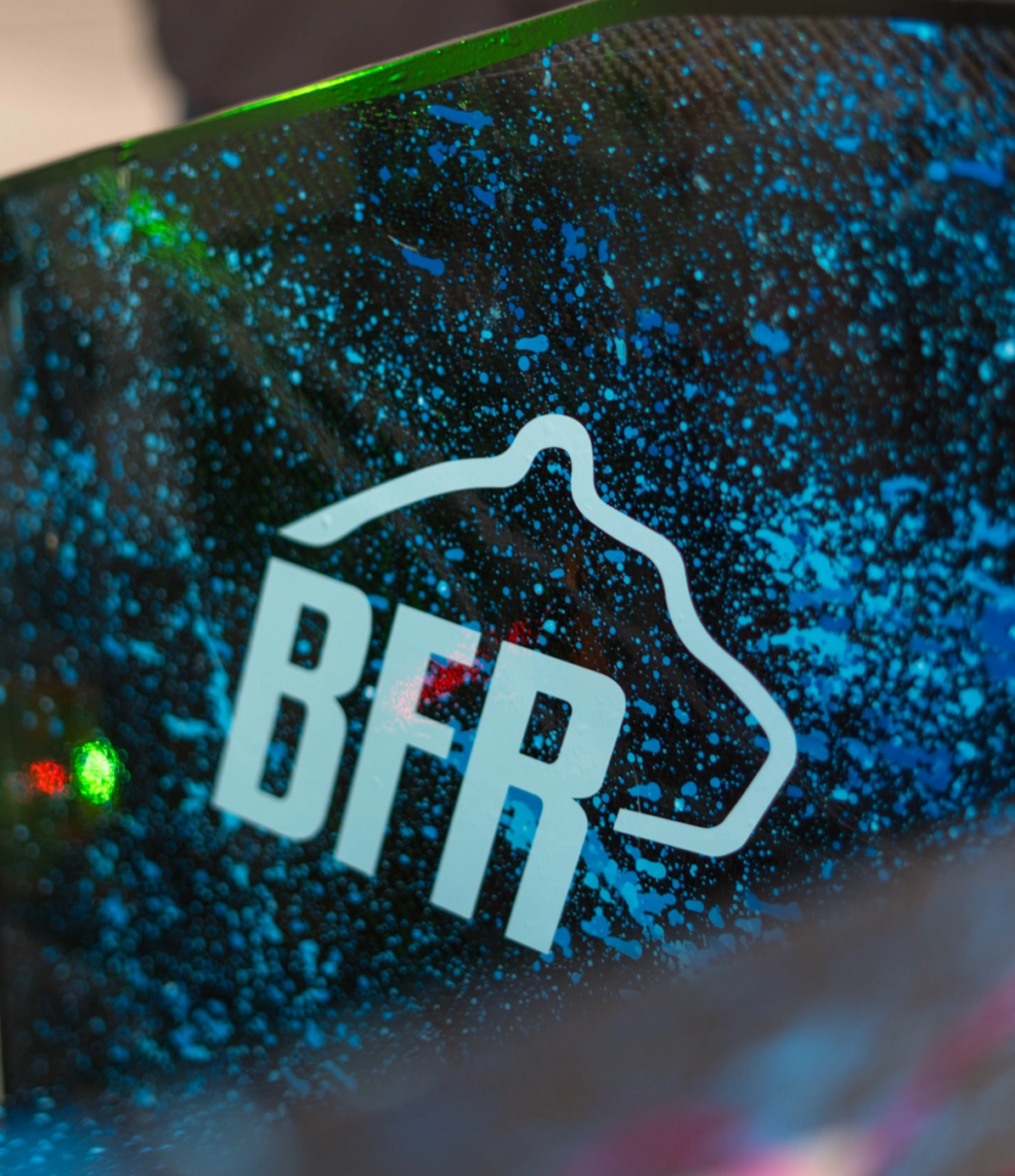
<p>You can see the effect at play here. I painted with a thinner substrate on the lower layers and just kept the white and blue on the topmost layers thin.</p>

<table style="border-collapse: collapse; width: 100%;">
  <tr>
    <td style="padding: 0 4px; text-align: center;"><img src="/assets/images/posts/2026-05-28-painting-mk11/DF5F281E-A81C-429B-B981-606BB83FFE01_1_105_c.jpeg" style="height: 300px; width: 100%; object-fit: cover;" /></td>
    <td style="padding: 0 4px; text-align: center;"><img src="/assets/images/posts/2026-05-28-painting-mk11/C040F190-B592-4233-BBCA-0261822833C5_1_105_c.jpeg" style="height: 300px; width: 100%; object-fit: cover;" /></td>
  </tr>
</table>

<table style="border-collapse: collapse; width: 100%;">
  <tr>
    <td style="padding: 0 4px; text-align: center;"><img src="/assets/images/posts/2026-05-28-painting-mk11/54336A89-1B4F-4AFE-B831-F9E6EF9C30CD_1_105_c.jpeg" style="height: 240px; width: 100%; object-fit: cover;" /></td>
    <td style="padding: 0 4px; text-align: center;"><img src="/assets/images/posts/2026-05-28-painting-mk11/289C6D29-485A-4BD9-B3FE-D119C0F03EAD_1_105_c.jpeg" style="height: 240px; width: 100%; object-fit: cover;" /></td>
    <td style="padding: 0 4px; text-align: center;"><img src="/assets/images/posts/2026-05-28-painting-mk11/3C3EF6DC-C1EE-4B91-BBC2-082D81CCA04D_1_105_c.jpeg" style="height: 240px; width: 100%; object-fit: cover;" /></td>
  </tr>
</table>

<table style="border-collapse: collapse; width: 100%;">

  <td style="padding: 0 4px; text-align: center;"><img src="/assets/images/posts/2026-05-28-painting-mk11/2073FEDA-E08A-4E15-9FE7-D69C38BA6B44_1_105_c.jpeg" style="height: 300px; width: 100%; object-fit: cover;" /></td>

</table>

<table style="border-collapse: collapse; width: 100%;">
  <tr>
    <td style="padding: 0 4px; text-align: center;"><img src="/assets/images/posts/2026-05-28-painting-mk11/505e14d1-0693-4285-9be8-777bfe0a63e6.png" style="height: 240px; width: 100%; object-fit: cover;" /></td>
    <td style="padding: 0 4px; text-align: center;"><img src="/assets/images/posts/2026-05-28-painting-mk11/9b113a88-1acb-46c6-aa85-ff1431b5f4bd.png" style="height: 240px; width: 100%; object-fit: cover;" /></td>
  </tr>
</table>

<p>I’m from Ohio and nothing reminds me of that fact like palm trees. They scream LA.</p>

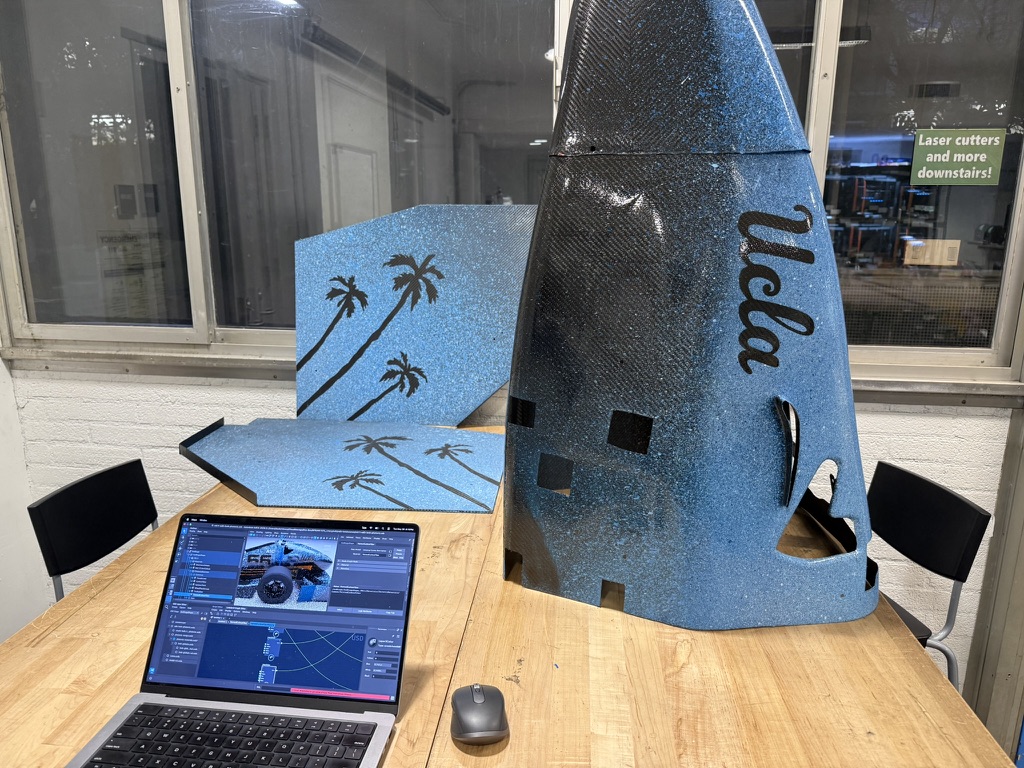
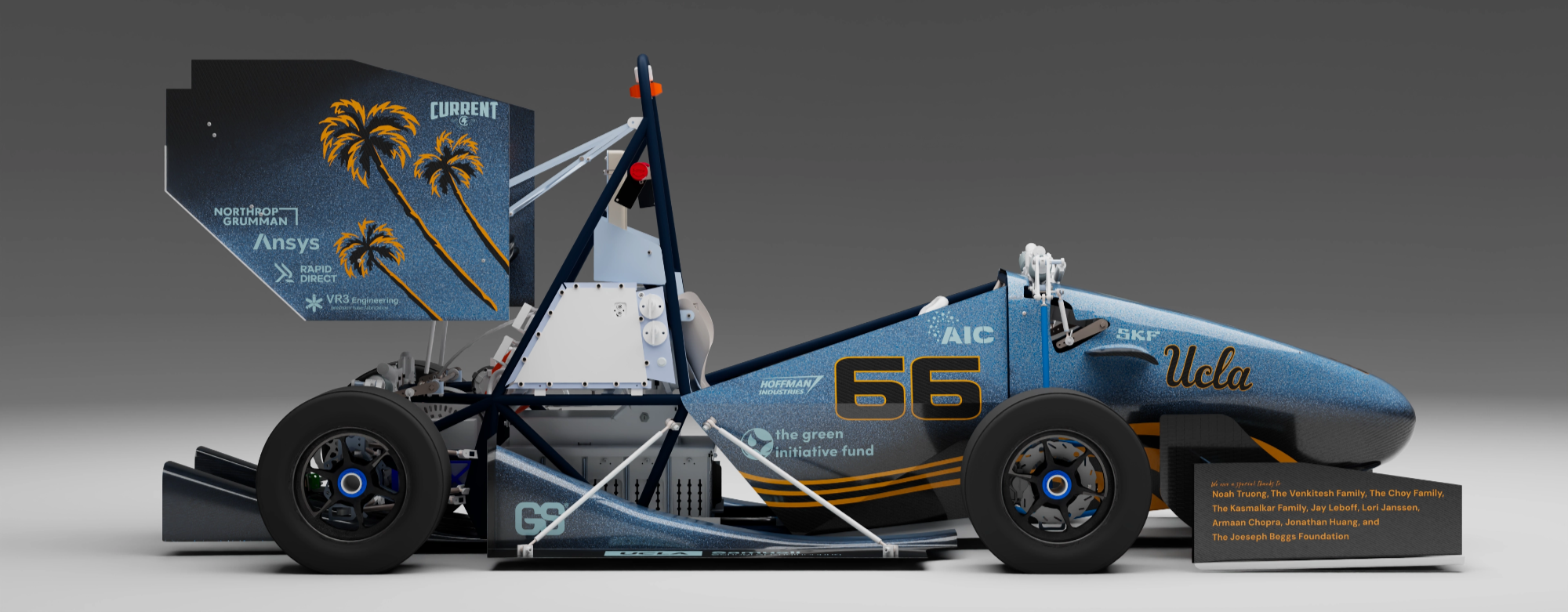
<p>After the team saw them in a concept drawing, they encrouraged me in include them, so we sort of morphed the splatter ocean look into a starry night. The RW endplates, the side panels, and the nose cone were painted with the gun. The rest was with a plastic fork - literally cub scouts with sling shots. They distribute FAR less paint than the gun which, at times, feels like using flamethrower to light a candle. Below is the final iteration of the render done before painting (with some missing decals).</p>

<p><img src="/assets/images/posts/2026-05-28-painting-mk11/fe9a48d9-b91f-4c8d-9628-9e5ae5558cf2.png" alt="" />
<img src="/assets/images/posts/2026-05-28-painting-mk11/ec2a97ae-0203-4491-85dc-9495f79fc06e.png" alt="" /></p>

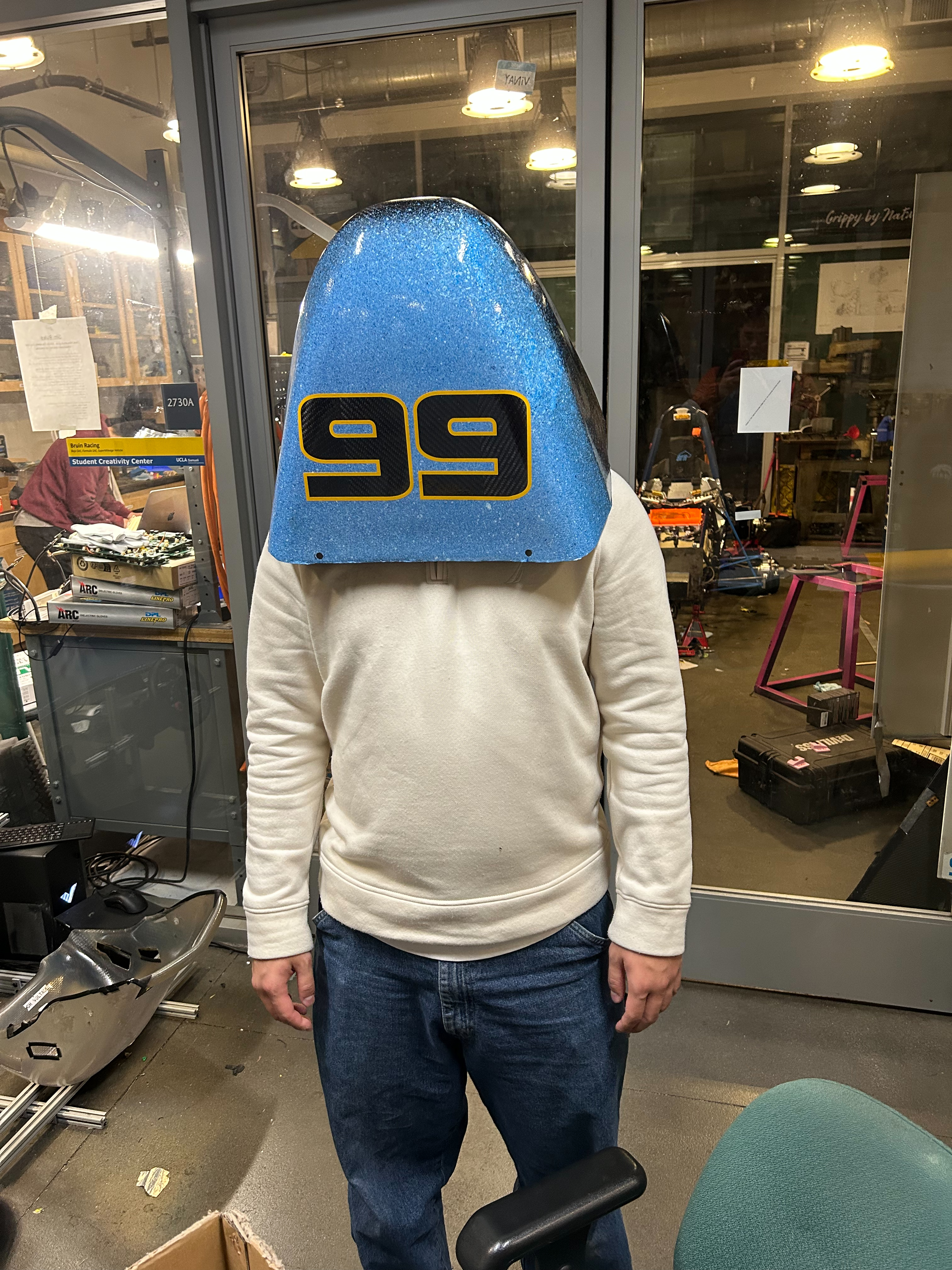
<p>Instead of using vinyl, the black areas are bare carbon. Team areo works incredibly on not only the shaping of the parts for drag, downforce and so on, but also the quality of manufactured parts. In addition to the look being preferable it is a great way to show off their work.</p>

<p>The trick with the bare carbon “decals” this is that the positions have to be locked in before painting and they can’t be changed. I avoided using pure white for the sponsors because it is too strong and opted instead for a baby blue. The yellow is a summer lemon/mango color. On its own it is more Berkeley than UCLA, but because of is minimal usage it adds some much needed warm to the flood of blue.</p>

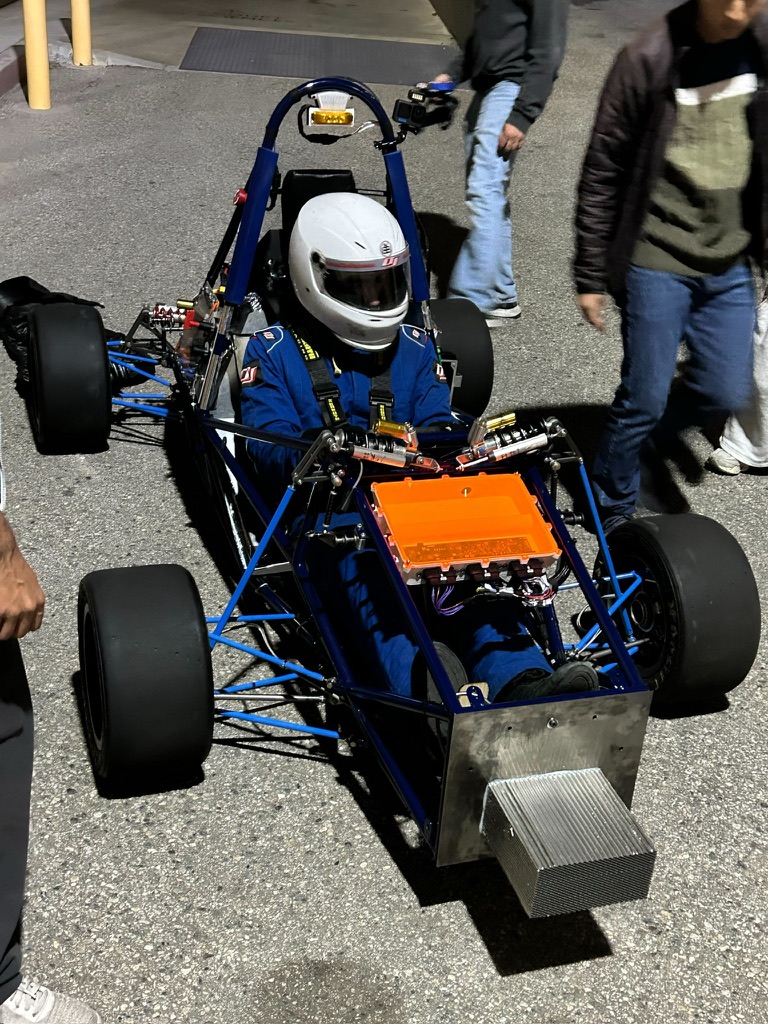
<p>We were also able to lock in a darker chassis color to basically get it out of the way (sorry Alex) and light blue suspension components to blend against the paint (sorry Parth).</p>

<table style="border-collapse: collapse; width: 100%;">
  <tr>
    <td style="padding: 0 4px; text-align: center;"><img src="/assets/images/posts/2026-05-28-painting-mk11/B660F094-1C72-4857-8232-193F4EBC430B_1_105_c.jpeg" style="height: 320px; width: 100%; object-fit: cover;" /></td>
    <td style="padding: 0 4px; text-align: center;"><img src="/assets/images/posts/2026-05-28-painting-mk11/image%204.png" style="height: 320px; width: 100%; object-fit: cover;" /></td>
  </tr>
</table>

<h2 id="timeline">Timeline</h2>

<p>It took probably took a 8 multi hour days of work. I wish we kept better track but the guesstimate is 8 hours of work over 7 days. This includes the painting but also the sanding and cleaning and all of that. We started on the 23rd of May and crunched over the next 2.5 weeks. Not recommended. Had I been more forward with the design this probably could’ve been avoided a little bit, but we were able to paint in larger batches as more of areo came together (which save alotta time). Ideally it would be a 2/3 session deal, to paint each coat in one go (primer/base/clear) with 24hrs in between each.</p>

<p>Because our vinyl is quite thick, it basically needs to be recut by hand. This is an on par time commitment with the paint but many people can work on it. Kevin, Luke, and Matt were able to work on vinyl stuff a couple times on their own which was great. Next year I’m curious if different vinyl could help us in this regard.</p>

<p>I had a lot of support in making this. Thanks to the areo and the directors for being trusting and supportive and chassis and suspension for not making their parts pink. Special thanks to Luke, Matt, and Kevin for assisting with the design and manufacturing. This wouldn’t have been possible without all y’all.</p>]]></content><author><name>Owen O&apos;Malley</name></author><summary type="html"><![CDATA[Paint is justifilbly a mess, so the goal was to paint the car in fashion only achievable by paint. Oh, and tell a cool story at the same time. That’s important too.]]></summary><media:thumbnail xmlns:media="http://search.yahoo.com/mrss/" url="/assets/images/posts/2026-05-28-painting-mk11/banner.jpeg" /><media:content medium="image" url="/assets/images/posts/2026-05-28-painting-mk11/banner.jpeg" xmlns:media="http://search.yahoo.com/mrss/" /></entry><entry><title type="html">Curves, B-Reps, &amp;amp; Chaos</title><link href="/blog/curves-breps-and-chaos/" rel="alternate" type="text/html" title="Curves, B-Reps, &amp;amp; Chaos" /><published>2026-04-11T00:00:00+00:00</published><updated>2026-04-11T00:00:00+00:00</updated><id>/blog/curves-breps-and-chaos</id><content type="html" xml:base="/blog/curves-breps-and-chaos/"><![CDATA[<p>The beauty of draftsmanship is increasingly distant from modern engineering. Being the champion of computer graphics that I am, I decided to solve this problem… with C++ and USD.</p>

<p>Draftsmanship is classic. I previously thought that such effects would best be captured by screen-space image kernels and non-photorealistic shading. While effective, they fail to portray the precision I’m after. Having worked with a handful of CAD tools for robotics, I became curious if there was a better bridge between the visual language of engineering and the tools used for 3D content creation.</p>

<p>The trick is in the geometry.</p>

<p>Those who work with 3D content creation tools are generally familiar with meshes. They are the primary representation used throughout most media pipelines. Engineers, however, generally prefer a parametric representation called B-rep (boundary representation) as the canonical representation of a part. The unmistakable “CAD” look comes from this distinction. For each one of the faces, the boundary is rasterized in screen space as a black line with a constant width.</p>

<p>For engineering applications, these edges aren’t particularly important once the model is converted for simulation or manufacturing, so most tools don’t make much effort to preserve them. In the “high-end” of rendering for VFX and animation, parametric geometry has largely become a legacy feature, with meshes and curves being the dominant representations.</p>

<p>Luckily, B-rep to mesh is a fairly standard operation in engineering. The harder problem is everything around it. CAD models are hierarchical, heavily instanced, and often carry metadata that is useful long after the geometry itself has been converted. If only there were a widely accepted format designed to ferry all of this information into a modern 3D application…</p>

<p>Enter OpenUSD! It is a blah, blah. I don’t need to introduce the benefits of this format. In a CAD context however, the only player in town that works with these files natively is omniverse. It only works with a nvidia-ized system which is less than ideal, and it doesn’t mesh the wireframe or the sketches. I’ve also found that it is flakey and no super undebuggable.</p>

<h2 id="step-to-usd">Step To USD</h2>

<p>You can view the code <a href="https://github.com/bruinformula/step-to-usd/tree/main">here.</a> This is the first serious CLI I’ve written and been forced to use. The goals were as follows:</p>
<ul>
  <li><strong>Novel geometry.</strong> The tool had to embed wireframes (and sketches time permiting), so we can get the classy CAD look.</li>
  <li><strong>Fast and robust.</strong> Car assemblies are large and full of warts, so iteration is important. Given the trouble that I had with Omniverse, the iteration loop would have to be tight such that problematic assemblies could be pointpointed quickly. Also, during the look development process, this proved handy for remeshing parts with new parameters.</li>
  <li><strong>Per Prim Overrides</strong> The CLI itself is minimal. All of the “options” are applied per prim and reside in <a href="https://github.com/bruinformula/step-to-usd/tree/main/lib/StepSchema/schema.usda">a usd schema.</a></li>
</ul>

<p>The user will start by writing a usd stage that looks something like:</p>
<pre><code class="language-usda">#usda 1.0
(
    defaultPrim = "WonderfulModel"
    metersPerUnit = 0.001
    upAxis = "Z"
)

def StepTessellationOptions "DefaultOptions" {
    double step:mesh:angularDeflection = 0.1
    double step:mesh:linearDeflection = 0.1
    # other options...
}

def StepContainer "WonderfulModel" {
    asset step:sourceAsset = @../step/model.STEP@
    def StepPrototypes "Prototypes" {
        rel step:defaultParams = &lt;/DefaultOptions&gt;
    }
}
</code></pre>
<p>The user feeds a CAD file into the CLI, which traverses the stage to find the <code class="language-plaintext highlighter-rouge">StepContainer</code>. From there, the tool generates two main prims: <code class="language-plaintext highlighter-rouge">{MODEL_PATH}/Assembly</code> and <code class="language-plaintext highlighter-rouge">{MODEL_PATH}/Prototypes</code> (<code class="language-plaintext highlighter-rouge">MODEL_PATH</code> is <code class="language-plaintext highlighter-rouge">/WonderfulModel</code> in this case).</p>

<div class="language-bash highlighter-rouge"><div class="highlight"><pre class="highlight"><code><span class="o">(</span>cg<span class="o">)</span> duck@capote mk11 % stepmesh <span class="nt">-h</span>
 stepmesh <span class="nt">--</span> Meshes all StepContainer prims <span class="k">in </span>a Usd scene
 Options: 
    <span class="nt">-i</span>, <span class="nt">--input</span> &lt;path&gt;               Path to the input Usd file. 
    <span class="nt">-p</span>, <span class="nt">--prim</span>  &lt;sdfPath&gt;            Only tessellate the prim...
    <span class="nt">-q</span>, <span class="nt">--quiet</span>                      Suppress all output.
    <span class="nt">-v</span>, <span class="nt">--verbose</span>                    Prints like everything.
    <span class="nt">-h</span>, <span class="nt">--help</span>                       Prints this message.

    usage: stepmesh <span class="nt">-i</span> &lt;path&gt; <span class="o">[</span>options] 
</code></pre></div></div>

<p><strong><code class="language-plaintext highlighter-rouge">/Assembly</code></strong> is essentially a shell hierarchy that maintains the heirarchical structure of how the engineers originally authored the model. Leaf <code class="language-plaintext highlighter-rouge">Xform</code>s author reference arcs (with <code class="language-plaintext highlighter-rouge">instanceable = true</code>) back to the corresponding prototypes. This keeps the USD representation (mostly) renderer friendly and performant by just having a single level instance (see <a href="https://forum.aousd.org/t/how-to-prevent-instancer-flattening-in-hydra-2-0">AOUSD forum on hydra instance flattening</a>).</p>

<p><strong><code class="language-plaintext highlighter-rouge">/Prototypes</code></strong> contains a flat list of each unique prototype. Each prototype then contains a sub-prim for each geometry representation we generate: the mesh, wireframe, and any other derived geometry. At a high level, the geometry lives entirely under <code class="language-plaintext highlighter-rouge">*/Prototypes</code>, while <code class="language-plaintext highlighter-rouge">*/Assembly</code> only describes how those pieces are arranged.</p>

<p>The prototype generation is then broken up into independent jobs and fed through TBB. Special care is taken to avoid stage recomposition by batching the geometry output writes in huge <code class="language-plaintext highlighter-rouge">SdfChangeBlock</code>s. Alongside caching the parsed <code class="language-plaintext highlighter-rouge">.step</code> document, MK11 is meshed in right around 90 seconds.</p>

<div class="language-bash highlighter-rouge"><div class="highlight"><pre class="highlight"><code><span class="o">(</span>cg<span class="o">)</span> duck@capote mk11-model % stepmesh <span class="nt">-i</span> model-v3.usda                  
Loading cached XBF from /home/duck/mk11/mk11-model/step/model-v3.xbf
Working OCC length unit: 0.001000 m
Assembly tree built: 8659 nodes
  Assemblies:          2127
  Leaves:              6532
  Unique definitions:  1717
Container prim path: /Mk11
<span class="o">[</span>1717/1717] Writing prototypes  <span class="o">{</span><span class="nv">LOD</span><span class="o">=</span>low<span class="o">}</span>...
<span class="o">[</span>8659/8659] Writing Assembly...
<span class="o">[</span>1717/1717] Writing prototypes  <span class="o">{</span><span class="nv">LOD</span><span class="o">=</span>high<span class="o">}</span>...
<span class="o">[</span>8659/8659] Writing Assembly...
<span class="o">[</span>280/3434] Tessellating Geometry...
<span class="o">[</span>ERROR] OCC exception on /Mk11/Prototypes/COMPOUND_1_step_1__98e6574f <span class="o">(</span>def index 1075<span class="o">)</span>: Bnd_Box is void
<span class="o">[</span>281/3434] Tessellating Geometry...
<span class="o">[</span>ERROR] OCC exception on /Mk11/Prototypes/COMPOUND_1_step_1__98e6574f <span class="o">(</span>def index 1075<span class="o">)</span>: Bnd_Box is void
<span class="o">[</span>WARNING] ShapeFix_Shape <span class="k">for </span>part /Mk11/Prototypes/HV11_PCB_04_Integration_V3_1__665858fc: operation timed out
<span class="o">[</span>1347/3434] Tessellating Geometry...
<span class="o">[</span>ERROR] OCC exception on /Mk11/Prototypes/Part5_AD11_FW_001_FW_TOP_ASSEMBLY_FDR_1__88817cd8 <span class="o">(</span>def index 889<span class="o">)</span>: Bnd_Box is void
<span class="o">[</span>1348/3434] Tessellating Geometry...
<span class="o">[</span>ERROR] OCC exception on /Mk11/Prototypes/Part5_AD11_FW_001_FW_TOP_ASSEMBLY_FDR_1__88817cd8 <span class="o">(</span>def index 889<span class="o">)</span>: Bnd_Box is void
<span class="o">[</span>3434/3434] Writing geometry...
Total Time Taken: 82.046385 seconds

</code></pre></div></div>

<p>Engineers work like artists from the standpoint of the cleanliness of what they make, so error messages like these are really important. Mk11 had 1717 prototypes in total, all of which had to land in the final model.
In one instance, the HV panel, a particularly feature-rich assembly, was resolving as one solid in the STEP document and proving to be troublesome. When I opened the stage, the car took 8 seconds to open. Too many prims? As it turns out, every edge on every surface-mounted electrical component was generating a curve prim with two vertices each, resulting in 200-ish thousand sub-prims for the prototype! Upon finding this out, I added an option to coalesce the curves of a given solid into one prim.
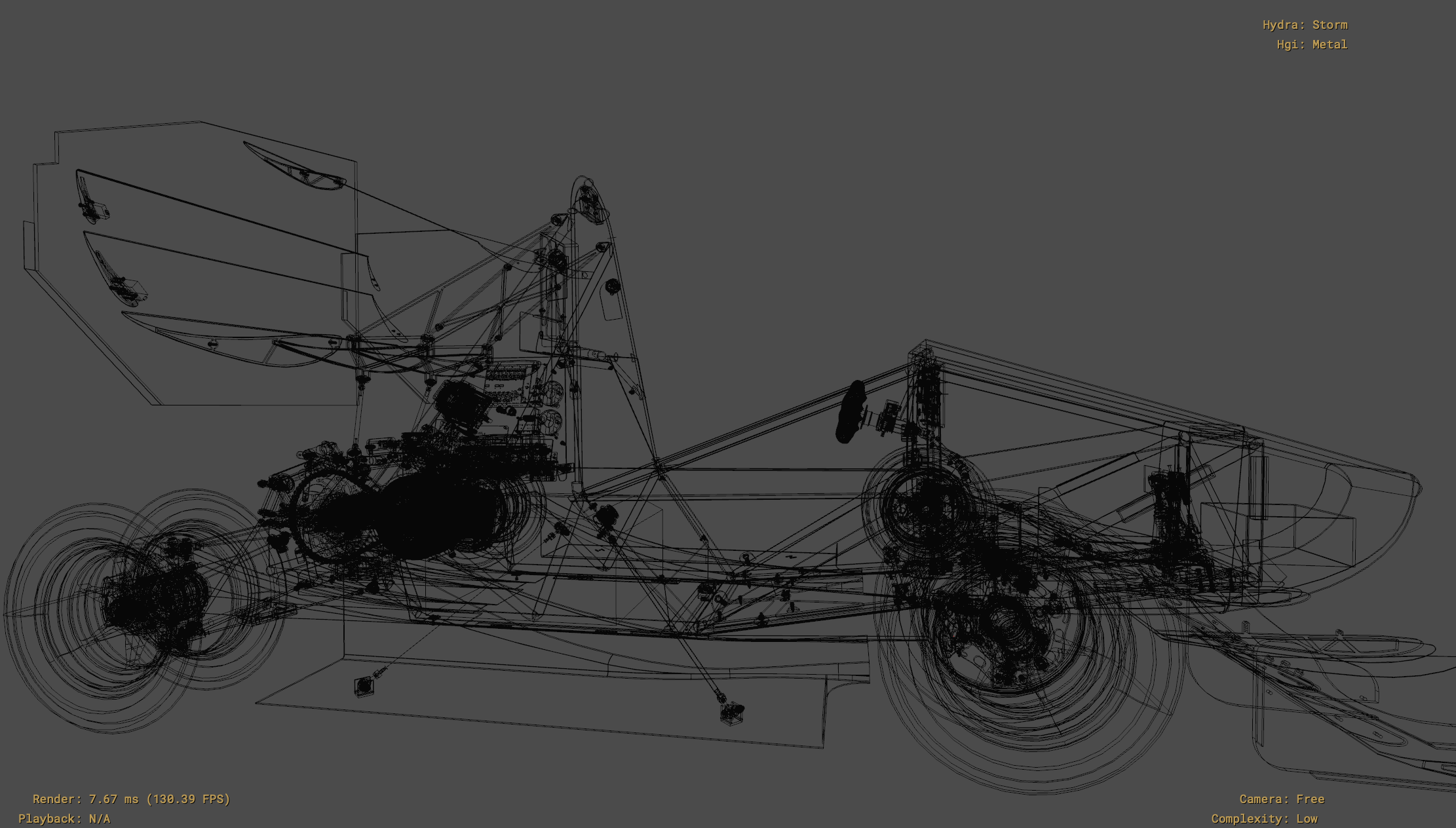
After much trial and error, I was tremendously excited to see Mk10 in usdview!</p>

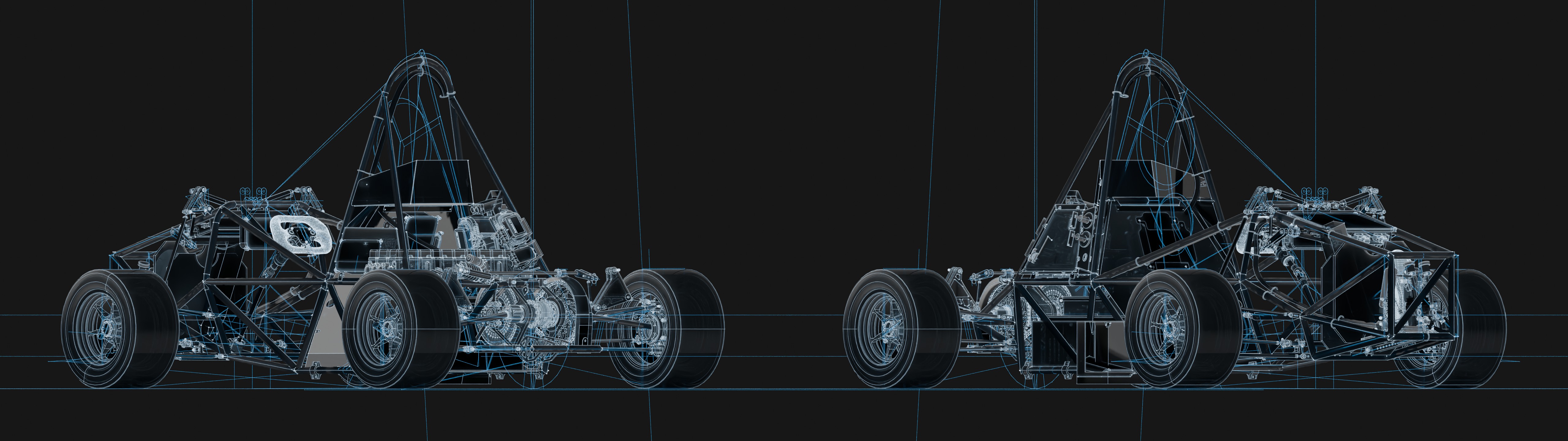
<p><img src="/assets/images/posts/2026-04-11-curves-breps-and-chaos/mk10-wireframe.png" alt="Mk10 in usdview" /></p>

<p>But I had yet to sucessfully shove the car in a production path tracer. When I attempted RenderMan XPU, the generated curves didn’t fit within the new <code class="language-plaintext highlighter-rouge">uint16</code> max vertex limit that RenderMan now expects. I had to change the coalescing to shard up to a user defined limit and alas, the car was rendering.</p>

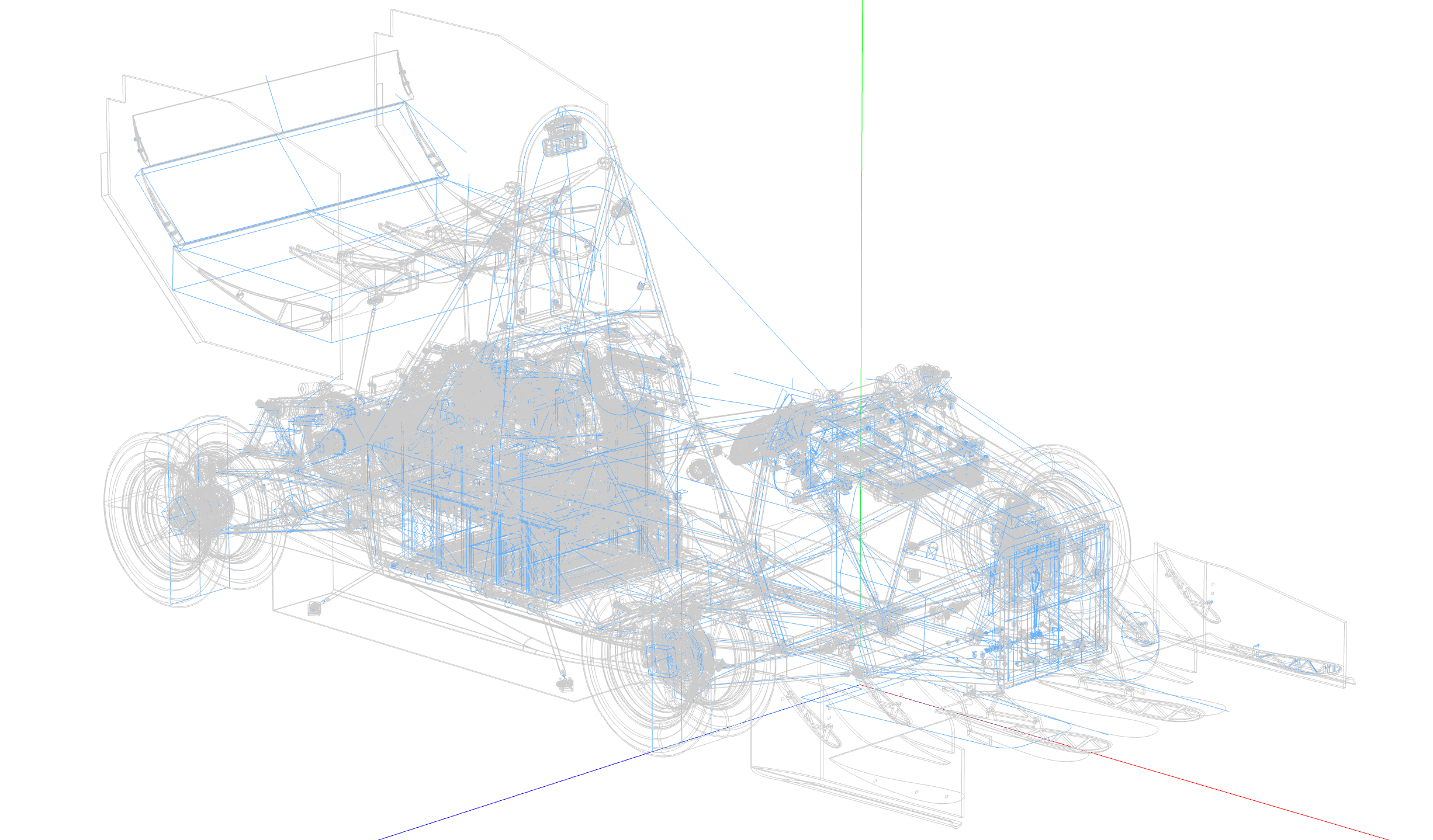
<p><img src="/assets/images/posts/2026-04-11-curves-breps-and-chaos/mk11-in-cycles.jpg" alt="Mk11 in Cycles" /></p>

<p>What is up with those lines? Well, initially they appear to asymptotically explode to infinity, so maybe there was a divide-by-zero somewhere? No. The model in Fusion 360 shows the same thing, so this was firmly a SolidWorks export problem.
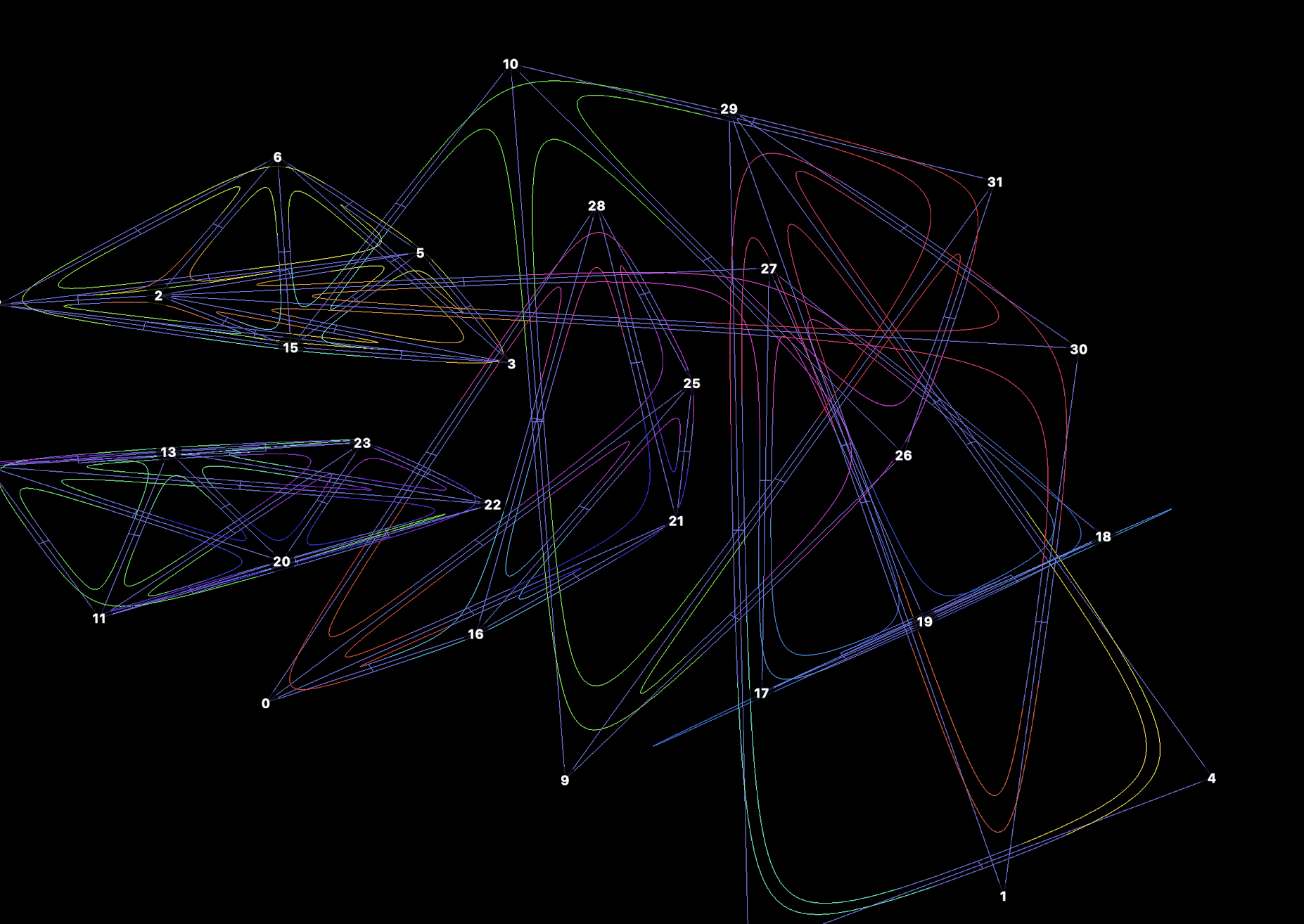
Okay, I should mention something. The tool takes in STEP files, but those aren’t modeled directly by the engineers. They use SolidWorks, which has its own format. I would’ve built the tool around the respresentation directly, but the provided C++ API is closed source and only works on DOS which makes it weird. Since the curves can be optionally split out into multiple prims, I deactivated the problematic curves one by one.</p>

<p><img src="/assets/images/posts/2026-04-11-curves-breps-and-chaos/mk11-wireframe.png" alt="Mk11 in usdview" /></p>

<h2 id="future-directions">Future Directions</h2>

<p><em>“There is always one more thing to do.”</em></p>

<p>Top of mind is a better meshing algorithm. Right now the alrogihm used is the default one included with opencascade. In addition to being slow the topology is poor. An alternate meshing scheme could go a long way in reducing potential rendering artifacts and triangle counts. Instant meshes or quadriflow would be a great starting point and are both open source. There is potentially a path towards a ‘BRep guided’ solution where the the smoothness energy and tangent fields are guided by sampling BRep topology instead of relying exclusively on one extracted from the mesh.</p>

<p>There are some others but that is the big one. Stay tuned for part two!</p>]]></content><author><name>Owen O&apos;Malley</name></author><summary type="html"><![CDATA[The beauty of draftsmanship is increasingly distant from modern engineering. Being the champion of computer graphics that I am, I decided to solve this problem… with C++ and USD.]]></summary><media:thumbnail xmlns:media="http://search.yahoo.com/mrss/" url="/assets/images/posts/2026-04-11-curves-breps-and-chaos/banner.jpg" /><media:content medium="image" url="/assets/images/posts/2026-04-11-curves-breps-and-chaos/banner.jpg" xmlns:media="http://search.yahoo.com/mrss/" /></entry><entry><title type="html">Movie Web - Part 1</title><link href="/blog/movie-viz-part-1/" rel="alternate" type="text/html" title="Movie Web - Part 1" /><published>2026-01-24T00:00:00+00:00</published><updated>2026-01-24T00:00:00+00:00</updated><id>/blog/movie-viz-part-1</id><content type="html" xml:base="/blog/movie-viz-part-1/"><![CDATA[<p>Choice can be a drag. For finding movies in particular, modern interfaces don’t help at a all. At times it feels like navigation, so why not make a map out of it?</p>

<p>As the saying goes, a picture is worth a thousand words. On occasion, I’ll see a great data visualization that just blows me away. At the surface, the data is just reshaped to be useful, but often times a story is told that no one expected.</p>

<p>At times, modern web interfaces are kinda drab because they feel like databases. Not much in the design seperates the UI from the data layout. Espcially when it comes to picking films, there have been too many instances of me just sort of scrolling. “Thank you, next” as Ariana Grande might say.</p>

<p>I decided to to turn this into a realtime rendering problem. There are 65,000 ish films in the kaggle dataset, and I’d like to interactively render all of them in a force directed-graph. The goal is to make exploring the movies like wandering through a map.</p>

<h2 id="but-what-is-a-force-directed-graph">But What is a Force Directed Graph</h2>

<p>They’re very popular, I’ll have you know.</p>

<div style="max-width: 600px; margin: 5px 5px;">
  <canvas id="force-graph"></canvas>
</div>
<script>
(function () {
  const nodeLabels = ['A', 'B', 'C', 'D', 'E', 'F', 'G', 'H', 'I'];
  const edges = [
    [0, 1], [0, 2], [1, 2],   // cluster 1
    [2, 3],                   // bridge
    [3, 4], [3, 5], [4, 5],   // cluster 2
    [5, 6],                   // bridge
    [6, 7], [6, 8], [7, 8]    // cluster 3
  ];
  const nodes = nodeLabels.map(label => ({ label }));

  // ---- simple force-directed layout (repulsion + springs + centering) ----
  const width = 500, height = 350;
  nodes.forEach(n => {
    n.x = width / 2 + (Math.random() - 0.5) * 40;
    n.y = height / 2 + (Math.random() - 0.5) * 40;
    n.vx = 0; n.vy = 0;
  });

  const REPULSION = 10000;
  const SPRING_LENGTH = 70;
  const SPRING_STRENGTH = 0.02;
  const CENTER_STRENGTH = 0.01;
  const DAMPING = 0.85;

  for (let iter = 0; iter < 400; iter++) {
    // nodes push each other apart
    for (let i = 0; i < nodes.length; i++) {
      for (let j = i + 1; j < nodes.length; j++) {
        const a = nodes[i], b = nodes[j];
        const dx = a.x - b.x, dy = a.y - b.y;
        const distSq = dx * dx + dy * dy || 0.01;
        const dist = Math.sqrt(distSq);
        const force = REPULSION / distSq;
        const fx = (dx / dist) * force, fy = (dy / dist) * force;
        a.vx += fx; a.vy += fy;
        b.vx -= fx; b.vy -= fy;
      }
    }
    // edges pull connected nodes together like springs
    edges.forEach(([i, j]) => {
      const a = nodes[i], b = nodes[j];
      const dx = b.x - a.x, dy = b.y - a.y;
      const dist = Math.sqrt(dx * dx + dy * dy) || 0.01;
      const force = (dist - SPRING_LENGTH) * SPRING_STRENGTH;
      const fx = (dx / dist) * force, fy = (dy / dist) * force;
      a.vx += fx; a.vy += fy;
      b.vx -= fx; b.vy -= fy;
    });
    // gentle pull toward center so the graph doesn't drift off-canvas
    nodes.forEach(n => {
      n.vx += (width / 2 - n.x) * CENTER_STRENGTH;
      n.vy += (height / 2 - n.y) * CENTER_STRENGTH;
    });
    // integrate with damping
    nodes.forEach(n => {
      n.vx *= DAMPING; n.vy *= DAMPING;
      n.x += n.vx; n.y += n.vy;
    });
  }

  // ---- plugin: draw the edges behind the node points ----
  const edgesPlugin = {
    id: 'edgesPlugin',
    beforeDatasetsDraw(chart) {
      const meta = chart.getDatasetMeta(0);
      const { ctx } = chart;
      ctx.save();
      ctx.strokeStyle = '#E2DDD8';
      ctx.lineWidth = 1.5;
      edges.forEach(([i, j]) => {
        const p1 = meta.data[i], p2 = meta.data[j];
        if (!p1 || !p2) return;
        ctx.beginPath();
        ctx.moveTo(p1.x, p1.y);
        ctx.lineTo(p2.x, p2.y);
        ctx.stroke();
      });
      ctx.restore();
    }
  };

  // ---- plugin: draw the node letter labels on top ----
  const nodeLabelsPlugin = {
    id: 'nodeLabelsPlugin',
    afterDatasetsDraw(chart) {
      const meta = chart.getDatasetMeta(0);
      const { ctx } = chart;
      ctx.save();
      ctx.font = "11px 'DM Mono', monospace";
      ctx.fillStyle = '#F5F2EF';
      ctx.textAlign = 'center';
      ctx.textBaseline = 'middle';
      meta.data.forEach((point, i) => {
        ctx.fillText(nodeLabels[i], point.x, point.y);
      });
      ctx.restore();
    }
  };

  new Chart(document.getElementById('force-graph'), {
    type: 'scatter',
    data: {
      datasets: [{
        label: 'Nodes',
        data: nodes.map(n => ({ x: n.x, y: n.y })),
        backgroundColor: '#2D4A3E',
        borderColor: '#1C1917',
        borderWidth: 1,
        pointRadius: 9,
        pointHoverRadius: 11
      }]
    },
    options: {
      responsive: true,
      aspectRatio: width / height,
      animation: false,
      layout: { padding: 20 },
      plugins: {
        legend: { display: false },
        tooltip: {
          callbacks: {
            label: (context) => nodeLabels[context.dataIndex]
          }
        }
      },
      scales: {
        x: { display: false, min: 0, max: width },
        y: { display: false, min: 0, max: height }
      }
    },
    plugins: [edgesPlugin, nodeLabelsPlugin]
  });
})();
</script>

<p>Basically, it is a particle simulation. Every particle is a node. The nodes repel like electrons (all to all). Linked nodes are treated as springs and attract each other. This is a textbook example of an $ O(N^2) $ problem commonly used in computer science school. There is a high degree of implicit parallelism for both repulsion and attraction, but their differences dictate seperate treatment.</p>

<h2 id="current-performance-optimizations">Current Performance Optimizations</h2>

<p>Just to get a felling of cost, with an $ O(N^2) $ algorithm disappear 65,000 bodies each computing pairwise forces against each other is billions of interactions each with thousands of instructions.</p>

<h3 id="barnes-hunt-for-replusion">Barnes Hunt for Replusion</h3>
<p>The repulsive force of one node is a sum of its repulsion against all other nodes. Barnes &amp; Hunt propsed using a quadtree to compute forces on collections of neighboring particles rather than every one individually. The technique is very popular and relatively straightforward to impliment.</p>

<p>Given the goal of having it be realtime, it has to run on the gpu. One of the bains of gpu programming is branchy and recusive code. Modern gpus have a hard accelerated means of tree construction and traversal. Though these are for BVHs and ray tracing, recent research as explored their application in particle simulation. I may impliment this at a future date but for now I’m opting for a gpu implimentation of the original algorithm with a quadtree.</p>

<h3 id="brute-force-for-attraction">Brute Force for Attraction</h3>
<p>For attractive forces, things get a little tricky. Unlike the all to all nature of replusion, attractive forces are inheritly sparse and irregular. For simplicity sake, I’ve opted to basically</p>

<p>Right now I’ve sped up vector operations using Swift’s built in SIMD api. Without knowing the knitty gritties of the computer stack, I’m fairly confident in saying that it is inefficient.</p>

<p>The more interesting optimizations come from thinking less like a programmer and more like the hardware.</p>

<h3 id="a-simd-centric-design">A SIMD-Centric Design</h3>

<p>Modern GPUs don’t really execute one thread at a time. They execute groups of threads together in lockstep. On Apple Silicon GPUs that group consists of 32 lanes, called a SIMD-group (a warp on Nvidia). Normally, hard coding constants is considered bad practice. This is one of the few places where I think it’s justified. Instead of pretending each thread is an independent worker, I structured much of both the simulation and rendering around these groups.</p>

<p>For the particle simulation, this mostly shows up in reductions and broadcasts. Computing the bounding box, for example, doesn’t have every thread writing into shared memory. Each lane computes a local minimum and maximum before the entire SIMD-group reduces those values using <code class="language-plaintext highlighter-rouge">simd_min()</code> and <code class="language-plaintext highlighter-rouge">simd_max()</code>. Only lane zero performs the final write back to memory.</p>

<div class="language-cpp highlighter-rouge"><div class="highlight"><pre class="highlight"><code><span class="n">topLeftX</span> <span class="o">=</span> <span class="n">simd_min</span><span class="p">(</span><span class="n">topLeftX</span><span class="p">);</span>
<span class="n">topLeftY</span> <span class="o">=</span> <span class="n">simd_max</span><span class="p">(</span><span class="n">topLeftY</span><span class="p">);</span>
<span class="n">bottomRightX</span> <span class="o">=</span> <span class="n">simd_max</span><span class="p">(</span><span class="n">bottomRightX</span><span class="p">);</span>
<span class="n">bottomRightY</span> <span class="o">=</span> <span class="n">simd_min</span><span class="p">(</span><span class="n">bottomRightY</span><span class="p">);</span>

<span class="k">if</span> <span class="p">(</span><span class="n">simd_lane_id</span> <span class="o">==</span> <span class="mi">0</span><span class="p">)</span> <span class="p">{</span>
    <span class="n">topLeft</span><span class="p">.</span><span class="n">data</span><span class="p">[</span><span class="mi">0</span><span class="p">].</span><span class="n">x</span> <span class="o">=</span> <span class="o">-</span><span class="mf">0.99</span><span class="n">f</span><span class="p">;</span>
    <span class="n">topLeft</span><span class="p">.</span><span class="n">data</span><span class="p">[</span><span class="mi">0</span><span class="p">].</span><span class="n">y</span> <span class="o">=</span> <span class="mf">0.99</span><span class="n">f</span><span class="p">;</span>
    <span class="n">bottomRight</span><span class="p">.</span><span class="n">data</span><span class="p">[</span><span class="mi">0</span><span class="p">].</span><span class="n">x</span> <span class="o">=</span> <span class="mf">0.99</span><span class="n">f</span><span class="p">;</span>
    <span class="n">bottomRight</span><span class="p">.</span><span class="n">data</span><span class="p">[</span><span class="mi">0</span><span class="p">].</span><span class="n">y</span> <span class="o">=</span> <span class="o">-</span><span class="mf">0.99</span><span class="n">f</span><span class="p">;</span>
<span class="p">}</span>
</code></pre></div></div>

<p>The same pattern appears when computing the center of mass for each Barnes-Hut node. Every lane accumulates mass for a subset of particles, then the SIMD-group combines the partial sums before a single lane writes the result back to memory.</p>

<div class="language-cpp highlighter-rouge"><div class="highlight"><pre class="highlight"><code><span class="n">M</span> <span class="o">=</span> <span class="n">simd_sum</span><span class="p">(</span><span class="n">M</span><span class="p">);</span>
<span class="n">R</span><span class="p">.</span><span class="n">x</span> <span class="o">=</span> <span class="n">simd_sum</span><span class="p">(</span><span class="n">R</span><span class="p">.</span><span class="n">x</span><span class="p">);</span>
<span class="n">R</span><span class="p">.</span><span class="n">y</span> <span class="o">=</span> <span class="n">simd_sum</span><span class="p">(</span><span class="n">R</span><span class="p">.</span><span class="n">y</span><span class="p">);</span>

<span class="k">if</span> <span class="p">(</span><span class="n">simd_lane_id</span> <span class="o">==</span> <span class="mi">0</span> <span class="o">&amp;&amp;</span> <span class="n">M</span> <span class="o">&gt;</span> <span class="mf">0.0</span><span class="n">f</span><span class="p">)</span> <span class="p">{</span>
    <span class="n">R</span> <span class="o">/=</span> <span class="n">M</span><span class="p">;</span>
    <span class="n">totalMass</span><span class="p">.</span><span class="n">data</span><span class="p">[</span><span class="n">nodeIndex</span><span class="p">]</span> <span class="o">=</span> <span class="n">M</span><span class="p">;</span>
    <span class="n">centerOfMass</span><span class="p">.</span><span class="n">data</span><span class="p">[</span><span class="n">nodeIndex</span><span class="p">]</span> <span class="o">=</span> <span class="n">R</span><span class="p">;</span>
<span class="p">}</span>
</code></pre></div></div>

<p>The rendering pipeline leans even harder into this idea.</p>

<p>Instead of asking <em>“How does this edge generate its geometry?”</em> it’s better to ask <em>“How do 32 edges generate their geometry together?”</em></p>

<p>I wanted the graph to have a neuron-like appearance. Every edge has to blend smoothly into the previous and next edge around a node, so each thread needs information about its neighbors. A traditional vertex shader is a poor fit for this problem because every vertex is processed independently. Recovering neighboring information would require additional memory reads, often loading the same data multiple times.</p>

<p>Object and mesh shaders offer a much more data-centric programming model. Rather than treating vertices as the fundamental unit of work, an entire threadgroup cooperates to generate a small piece of the graph. Each thread is responsible for constructing the geometry for a single half-edge. Interestingly the threadgroup is responsible for lanuching the mesh shader kernel with some magic handled by the scheduler.</p>

<pre><code class="language-metal">[[object]] void objectShader( 
  constant Buffer&amp; terminations [[buffer(xxx)]], 
  ... 
  object_data Payload&amp; payload [[payload]],
  mesh_grid_properties meshGridProperties, 
  ... 
  ushort tid [[thread_index_in_threadgroup]]) 
{
  compute_neuron_verticies(data, buffers...);
  initialize(&amp;payload, data);

  // Dispatch logic
  // Number of intermediate sample points on the bezier curve 
  // (results in numCurveLines + 1 line segments for the curve)
  // Max value depends on mesh limits: must satisfy 
  // threads_per_threadgroup * (numCurveLines + 2) &lt;= 256
  // With 32 threads: max numCurveLines = floor(256/32) - 6 = 8

  constexpr int lod = 6; // Should be based on zoom
  if (tid != 0) return;

  // Launches more threadgroups dynamcially based on the lod
  // More threadgroups, more triangles, more resolution!
  payload.numEdges = batchCount;
  payload.lod = lod;
  meshGridProperties.set_threadgroups_per_grid(uint3(lod, 1, 1)); 
}
</code></pre>

<p>Before rendering, a compute pass sorts the half-edges by their source node - two buffers each representing the source and target node.</p>
<ul>
  <li>The source node buffer is grouped by index: <em>A,A,A,A,B,C,C,C,C</em></li>
  <li>The target nodes are radix sorted by angle to go clockwise.</li>
</ul>

<p>This means neighboring threads usually process neighboring edges in memory. The result is much better cache locality and, more importantly, it creates opportunities for threads to cooperate directly. Is there a better criterion for sorting? Maybe.</p>

<p>Each lane computes the geometry for its edge—its midpoint, tangent, and perpendicular offset. Instead of loading the previous or next edge from device memory, those values are exchanged directly between neighboring lanes using SIMD shuffle instructions (hence the angle sort pass). The data never leaves the SIMD-group and syronization primitives are avoided outright.</p>

<div class="language-cpp highlighter-rouge"><div class="highlight"><pre class="highlight"><code><span class="k">struct</span> <span class="nc">Payload</span> <span class="p">{</span>
    <span class="n">float2</span> <span class="n">origin</span><span class="p">[</span><span class="mi">32</span><span class="p">];</span>
    
    <span class="n">float2</span> <span class="n">prevIntersection</span><span class="p">[</span><span class="mi">32</span><span class="p">];</span>
    <span class="n">float2</span> <span class="n">nextIntersection</span><span class="p">[</span><span class="mi">32</span><span class="p">];</span>
    
    <span class="n">float2</span> <span class="n">prevMidpoint</span><span class="p">[</span><span class="mi">32</span><span class="p">];</span>
    <span class="n">float2</span> <span class="n">midpoint</span><span class="p">[</span><span class="mi">32</span><span class="p">];</span>
    <span class="n">float2</span> <span class="n">nextMidpoint</span><span class="p">[</span><span class="mi">32</span><span class="p">];</span>
    
    <span class="n">float2</span> <span class="n">prevJoint</span><span class="p">[</span><span class="mi">32</span><span class="p">];</span>
    <span class="n">float2</span> <span class="n">leftJoint</span><span class="p">[</span><span class="mi">32</span><span class="p">];</span>
    
    <span class="n">float2</span> <span class="n">rightJoint</span><span class="p">[</span><span class="mi">32</span><span class="p">];</span>
    <span class="n">float2</span> <span class="n">nextJoint</span><span class="p">[</span><span class="mi">32</span><span class="p">];</span>
    
    <span class="n">uint</span> <span class="n">gid</span><span class="p">[</span><span class="mi">32</span><span class="p">];</span>
    <span class="n">uint</span> <span class="n">numEdges</span><span class="p">;</span>
    <span class="n">uint</span> <span class="n">lod</span><span class="p">;</span>
<span class="p">};</span>
</code></pre></div></div>

<div class="language-cpp highlighter-rouge"><div class="highlight"><pre class="highlight"><code><span class="n">float2</span> <span class="n">prevMidpoint</span> <span class="o">=</span> <span class="n">simd_shuffle_up</span><span class="p">(</span><span class="n">midpoint</span><span class="p">,</span> <span class="mi">1</span><span class="p">);</span>
<span class="n">float2</span> <span class="n">nextMidpoint</span> <span class="o">=</span> <span class="n">simd_shuffle_down</span><span class="p">(</span><span class="n">midpoint</span><span class="p">,</span> <span class="mi">1</span><span class="p">);</span>

<span class="n">float2</span> <span class="n">prevJoint</span> <span class="o">=</span> <span class="n">simd_shuffle_up</span><span class="p">(</span><span class="n">joint</span><span class="p">,</span> <span class="mi">1</span><span class="p">);</span>
<span class="n">float2</span> <span class="n">nextJoint</span> <span class="o">=</span> <span class="n">simd_shuffle_down</span><span class="p">(</span><span class="n">joint</span><span class="p">,</span> <span class="mi">1</span><span class="p">);</span>
</code></pre></div></div>

<div style="max-width: 720px; margin: 5px 5px;">
  <canvas id="edge-centric-graph-corrected"></canvas>
</div>
<script src="https://cdn.jsdelivr.net/npm/chart.js"></script>

<script>
  (function () {
    // I gave the original code to gemini and got this with some modifications
    // Central Node Origin (0, 0)
    const origin = { x: 0, y: 0 };

    // Angle increases CCW: Lane i-1 (~36°) -> Lane i (90°) -> Lane i+1 (~144°)
    const edges = [
      { label: "Lane i-1 (simd_shuffle_up)",   target: { x: 5.5,  y: 4.0 }, color: "#64748B" }, // CCW Prev
      { label: "Lane i (Current Half-Edge)",   target: { x: 0.0,  y: 7.5 }, color: "#10B981" }, // Current
      { label: "Lane i+1 (simd_shuffle_down)", target: { x: -5.5, y: 4.0 }, color: "#64748B" }  // CCW Next
    ];

    // Half-edge perpendicular width
    const WIDTH = 0.5;

    // Helper: Perpendicular offset (-dy, dx) / len rotated +90 degrees CCW
    function getPerp(p1, p2) {
      const dx = p2.x - p1.x, dy = p2.y - p1.y;
      const len = Math.sqrt(dx * dx + dy * dy) || 1e-6;
      return { x: -dy / len, y: dx / len };
    }

    // Compute midpoints, deltas, and joint offsets per lane
    const geom = edges.map(e => {
      const delta = { x: e.target.x - origin.x, y: e.target.y - origin.y };
      const mid = { x: (origin.x + e.target.x) * 0.5, y: (origin.y + e.target.y) * 0.5 };
      const perp = getPerp(origin, e.target);
      const joint = { x: perp.x * WIDTH, y: perp.y * WIDTH };
      return {
        delta,
        mid,
        joint,
        // In CCW order: +joint is CCW (left) side, -joint is CW (right) side
        leftSide:  { x: mid.x + joint.x, y: mid.y + joint.y },
        rightSide: { x: mid.x - joint.x, y: mid.y - joint.y },
        target: e.target,
        color: e.color
      };
    });

    // 2D Line-Line Miter Intersection
    // Solves intersection of Line(p1, dir1) and Line(p2, dir2) using cross products
    function getMiterIntersection(p1, dir1, p2, dir2) {
      const p1p2 = { x: p2.x - p1.x, y: p2.y - p1.y };
      const cross = dir1.x * dir2.y - dir1.y * dir2.x;
      if (Math.abs(cross) < 1e-5) {
        return { x: (p1.x + p2.x) * 0.5, y: (p1.y + p2.y) * 0.5 };
      }
      const t = (p1p2.x * dir2.y - p1p2.y * dir2.x) / cross;
      return { x: p1.x + t * dir1.x, y: p1.y + t * dir1.y };
    }

    // prevIntersection: line from Lane i-1 CCW side (+joint) & Lane i CW side (-joint)
    const prevP1 = geom[0].leftSide;   // prevMidpoint + prevJoint
    const prevP2 = geom[1].rightSide;  // midpoint - joint
    const prevIntersection = getMiterIntersection(prevP1, geom[0].delta, prevP2, geom[1].delta);

    // nextIntersection: line from Lane i CCW side (+joint) & Lane i+1 CW side (-joint)
    const nextP1 = geom[1].leftSide;   // midpoint + joint
    const nextP2 = geom[2].rightSide;  // nextMidpoint - nextJoint
    const nextIntersection = getMiterIntersection(nextP1, geom[1].delta, nextP2, geom[2].delta);

    // 4. Exact Shader Math: Rational Conic Bezier Curve (Weight w = 3.0)
    // C(t) = [ (1-t)^2 P0 + 2w(1-t)t P1 + t^2 P2 ] / [ (1-t)^2 + 2w(1-t)t + t^2 ]
    function getConicBezierCurve(p0, p1, p2, weight = 3.0, steps = 24) {
      const pts = [];
      for (let i = 0; i <= steps; i++) {
        const t = i / steps;
        const u = 1 - t;
        const wTerm = 2 * weight * u * t;
        const den = u * u + wTerm + t * t;
        pts.push({
          x: (u * u * p0.x + wTerm * p1.x + t * t * p2.x) / den,
          y: (u * u * p0.y + wTerm * p1.y + t * t * p2.y) / den
        });
      }
      return pts;
    }

    // Left curve: from Lane i-1 inner joint -> prevIntersection -> Lane i right joint
    const prevCurve = getConicBezierCurve(prevP1, prevIntersection, prevP2, 3.0);
    // Right curve: from Lane i left joint -> nextIntersection -> Lane i+1 inner joint
    const nextCurve = getConicBezierCurve(nextP1, nextIntersection, nextP2, 3.0);

    // ---- Custom Chart.js Rendering Plugin ----
    const shaderGeometryPlugin = {
      id: 'shaderGeometryPlugin',
      beforeDatasetsDraw(chart) {
        const { ctx, scales: { x, y } } = chart;
        const toScreen = (p) => ({ x: x.getPixelForValue(p.x), y: y.getPixelForValue(p.y) });
        const origScreen = toScreen(origin);

        ctx.save();

        // A. Draw Skeleton Half-Edges (Center lines)
        ctx.setLineDash([4, 4]);
        ctx.lineWidth = 1.5;
        geom.forEach(g => {
          const sTarget = toScreen(g.target);
          ctx.strokeStyle = g.color;
          ctx.beginPath();
          ctx.moveTo(origScreen.x, origScreen.y);
          ctx.lineTo(sTarget.x, sTarget.y);
          ctx.stroke();
        });
        ctx.setLineDash([]);

        // B. Draw Dashed Miter Projection Lines (Offset edge extensions to intersection)
        ctx.setLineDash([2, 3]);
        ctx.lineWidth = 1.2;
        ctx.strokeStyle = "#94A3B8";
        [
          [prevP1, prevIntersection],
          [prevP2, prevIntersection],
          [nextP1, nextIntersection],
          [nextP2, nextIntersection]
        ].forEach(([fromPt, toPt]) => {
          const sFrom = toScreen(fromPt);
          const sTo = toScreen(toPt);
          ctx.beginPath();
          ctx.moveTo(sFrom.x, sFrom.y);
          ctx.lineTo(sTo.x, sTo.y);
          ctx.stroke();
        });
        ctx.setLineDash([]);

        // C. Draw Perpendicular Joint Segments at Midpoints
        ctx.lineWidth = 2.5;
        geom.forEach(g => {
          const sLeft = toScreen(g.leftSide);
          const sRight = toScreen(g.rightSide);
          ctx.strokeStyle = g.color;
          ctx.beginPath();
          ctx.moveTo(sLeft.x, sLeft.y);
          ctx.lineTo(sRight.x, sRight.y);
          ctx.stroke();
        });

        // D. Draw Conic Bezier Curves (w = 3.0)
        ctx.strokeStyle = "#F59E0B"; // Amber
        ctx.lineWidth = 3.5;
        [prevCurve, nextCurve].forEach(curvePts => {
          ctx.beginPath();
          curvePts.forEach((pt, idx) => {
            const s = toScreen(pt);
            if (idx === 0) ctx.moveTo(s.x, s.y);
            else ctx.lineTo(s.x, s.y);
          });
          ctx.stroke();
        });

        // E. Draw Miter Intersection Points
        const drawDot = (pt, color, radius = 5.5) => {
          const s = toScreen(pt);
          ctx.fillStyle = color;
          ctx.beginPath();
          ctx.arc(s.x, s.y, radius, 0, Math.PI * 2);
          ctx.fill();
        };

        drawDot(prevIntersection, "#EF4444", 6); // Red dot for prevIntersection
        drawDot(nextIntersection, "#EF4444", 6); // Red dot for nextIntersection

        // F. Labels and Mathematical Annotations
        ctx.font = "600 11px 'DM Mono', monospace";
        ctx.fillStyle = "#E2DDD8";
        ctx.textAlign = "center";

        ctx.fillStyle = "#EF4444";
        const sPrev = toScreen(prevIntersection);
        ctx.fillText("prevIntersection", sPrev.x - 115, sPrev.y + 30);

        const sNext = toScreen(nextIntersection);
        ctx.fillText("nextIntersection", sNext.x + 115, sNext.y + 30);

        const sMid = toScreen(geom[1].mid);
        ctx.fillStyle = "#10B981";
        ctx.fillText("Lane i Midpoint", sMid.x, sMid.y - 14);

        ctx.fillStyle = "#F59E0B";
        const sCurveLabel = toScreen({ x: 2.2, y: 3.1 });
        ctx.fillText("Conic Bezier", sCurveLabel.x - 5, sCurveLabel.y);

        ctx.restore();
      }
    };

    new Chart(document.getElementById('edge-centric-graph-corrected'), {
      type: 'scatter',
      data: {
        datasets: [
          {
            label: 'Nodes & Targets',
            data: [origin, geom[0].target, geom[1].target, geom[2].target],
            backgroundColor: ['#10B981', '#64748B', '#10B981', '#64748B'],
            pointRadius: [7, 6, 6, 6],
            pointHoverRadius: 8
          }
        ]
      },
      options: {
        responsive: true,
        aspectRatio: 1.45,
        animation: false,
        layout: { padding: 10 },
        plugins: {
          legend: { display: false },
          tooltip: {
            callbacks: {
              label: (ctx) => {
                const labels = [
                  "Node Origin (0,0)",
                  "Lane i-1: CCW Previous (simd_shuffle_up)",
                  "Lane i: Current Half-Edge",
                  "Lane i+1: CCW Next (simd_shuffle_down)"
                ];
                return labels[ctx.dataIndex];
              }
            }
          }
        },
        scales: {
          x: { min: -7.5, max: 7.5, display: false },
          y: { min: -0.5, max: 8.5, display: false }
        }
      },
      plugins: [shaderGeometryPlugin]
    });
  })();
</script>

<p>Of course, this only works while neighboring edges happen to live inside the same SIMD-group. Nodes with a very large degree naturally span multiple groups, while nodes with only a handful of edges leave unused lanes. Whenever a SIMD-group crosses one of these boundaries, the resultant seam demands that the missing neighbor be pulled from memory. Fortunately, as the number of nodes being rendered increases so does the coherency and ulitization.</p>

<h3 id="whats-next">What’s Next?</h3>

<p>At the moment, the priority is getting everything running smoothly. I’ve heard that premature optimization is a dangerous game, and maybe I’ve focused too much effort at this stage.</p>

<p>With the particle simulation and object shaders starting to take shape, the next step is to take on the later stages of the rendering pipeline.</p>

<p><img src="/assets/images/posts/2026-01-24-movie-viz-part-1/1-14.png" alt="alt text" /></p>]]></content><author><name>Owen O&apos;Malley</name></author><summary type="html"><![CDATA[Choice can be a drag. For finding movies in particular, modern interfaces don’t help at a all. At times it feels like navigation, so why not make a map out of it?]]></summary></entry><entry><title type="html">Setting Up the Blog</title><link href="/blog/setting-up-the-blog/" rel="alternate" type="text/html" title="Setting Up the Blog" /><published>2026-01-03T00:00:00+00:00</published><updated>2026-01-03T00:00:00+00:00</updated><id>/blog/setting-up-the-blog</id><content type="html" xml:base="/blog/setting-up-the-blog/"><![CDATA[<p>Are blogs even cool anymore? I don’t know. There have been too many times I wish I had some sort of written record of what I work on. Today is the Saturday to set it up!</p>

<p>Writing is annoying enough already, so things on the backend shouldn’t make it more difficult. Jekyll seems reasonablly popular, so I using that. It allows me to pipe out some markdown and then have it magically become a webpage in a fashion of my choosing. Instead of using a theme I opted to hack together some html and css with <a href="https://templatemo.com/tm-629-nexus-system">this theme</a> as a starting point. A lot of the high tech and animation jazz was removed in favor of a clean sheet of paper vibe. Hopefully it ages well.</p>

<hr />

<h1 id="some-rendering-tests">Some rendering tests…</h1>

<h2 id="code">Code</h2>

<div class="language-cpp highlighter-rouge"><div class="highlight"><pre class="highlight"><code><span class="cp">#include</span> <span class="cpf">&lt;iostream&gt;</span><span class="cp">
</span>
<span class="kt">int</span> <span class="nf">main</span><span class="p">(</span><span class="kt">void</span><span class="p">)</span> <span class="p">{</span>
    <span class="n">std</span><span class="o">::</span><span class="n">cout</span> <span class="o">&lt;&lt;</span> <span class="s">"Uhhh..."</span> <span class="o">&lt;&lt;</span> <span class="n">std</span><span class="o">::</span><span class="n">endl</span><span class="p">;</span>
<span class="p">}</span>
</code></pre></div></div>
<div class="language-python highlighter-rouge"><div class="highlight"><pre class="highlight"><code><span class="kn">import</span> <span class="nn">os</span>

<span class="k">if</span> <span class="n">__name__</span> <span class="o">==</span> <span class="s">"__main__"</span><span class="p">:</span>
    <span class="k">print</span><span class="p">(</span><span class="s">"Uhhh..."</span><span class="p">)</span>
</code></pre></div></div>
<pre><code class="language-usda">#usda 1.0

def Sphere "Uhhh" {
    double radius = 1
}
</code></pre>

<h2 id="math">Math</h2>

<p>Some tests using MathJax.</p>

\[A = \pi r^2\]

\[a^2 + b^2 = c^2\]

\[y = 2x + 1\]

<p>Inline example: the slope of a line is $m = \frac{\Delta y}{\Delta x}$.</p>

\[\frac{d}{dx}(x^2) = 2x\]

\[\frac{d}{dx}(\sin x) = \cos x\]

\[\int_0^2 x^2\,dx = \frac{8}{3}\]

\[\frac{d}{dx}\left(\int_0^x t^2\,dt\right)=x^2\]

<p>Inline: the derivative of $x^3$ is $\frac{d}{dx}(x^3)=3x^2$.</p>

<p>Inline: the integral $\int_0^1 x\,dx=\frac12$ gives the area under the line from 0 to 1.</p>

<p>Inline: at $x=2$, the slope of $f(x)=x^2$ is $f’(2)=4$.</p>

<h2 id="table">Table</h2>

<table>
  <thead>
    <tr>
      <th style="text-align: left">Quantity</th>
      <th style="text-align: center">Symbol</th>
      <th style="text-align: right">Value</th>
      <th style="text-align: right">Unit</th>
    </tr>
  </thead>
  <tbody>
    <tr>
      <td style="text-align: left">Radius</td>
      <td style="text-align: center">$r$</td>
      <td style="text-align: right">5</td>
      <td style="text-align: right">cm</td>
    </tr>
    <tr>
      <td style="text-align: left">Diameter</td>
      <td style="text-align: center">$d$</td>
      <td style="text-align: right">10</td>
      <td style="text-align: right">cm</td>
    </tr>
    <tr>
      <td style="text-align: left">Circumference</td>
      <td style="text-align: center">$C$</td>
      <td style="text-align: right">31.42</td>
      <td style="text-align: right">cm</td>
    </tr>
    <tr>
      <td style="text-align: left">Area</td>
      <td style="text-align: center">$A$</td>
      <td style="text-align: right">78.54</td>
      <td style="text-align: right">cm²</td>
    </tr>
    <tr>
      <td style="text-align: left">Pi</td>
      <td style="text-align: center">$\pi$</td>
      <td style="text-align: right">3.1416</td>
      <td style="text-align: right">—</td>
    </tr>
  </tbody>
</table>

<h2 id="chart">Chart</h2>

<p>A chart using Chart.js.</p>

<div style="max-width: 600px; margin: 40px auto;">
  <canvas id="line-chart"></canvas>
</div>

<script>
(function () {
  const labels = [0, 1, 2, 3, 4, 5];
  const values = labels.map(x => 2 * x + 1);

  new Chart(document.getElementById('line-chart'), {
    type: 'line',
    data: {
      labels,
      datasets: [{
        label: 'y = 2x + 1',
        data: values,
        borderColor: '#2D4A3E',
        borderWidth: 2,
        pointRadius: 3,
        tension: 0.2
      }]
    },
    options: {
      responsive: true,
      animation: false,
      plugins: {
        legend: {
          labels: {
            font: {
              family: "'DM Mono', monospace",
              size: 11
            },
            color: '#78716C'
          }
        },
        title: {
          display: true,
          text: 'Simple Linear Function',
          font: {
            family: "'DM Sans', sans-serif",
            size: 13,
            weight: '600'
          },
          color: '#1C1917'
        }
      },
      scales: {
        x: {
          title: {
            display: true,
            text: 'x'
          },
          grid: {
            color: '#E2DDD8'
          }
        },
        y: {
          title: {
            display: true,
            text: 'y'
          },
          grid: {
            color: '#E2DDD8'
          }
        }
      }
    }
  });
})();
</script>]]></content><author><name>Owen O&apos;Malley</name></author><summary type="html"><![CDATA[Are blogs even cool anymore? I don’t know. There have been too many times I wish I had some sort of written record of what I work on. Today is the Saturday to set it up!]]></summary></entry></feed>